|
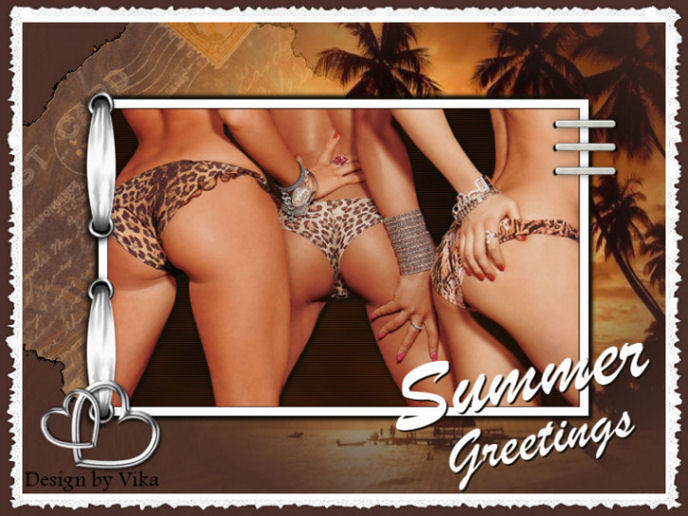
~*~ Summer Dreams ~*~
Vika's original Dutch tutorials
can be viewed here
Terms
of
Use
None
of the
images
used
in
these
tutorials,
which is offered for download in the zip files,
nor the tutorial results may
be
used
for
any
commercial
purposes
in
any form whatsoever
!!
The
copyright
remains
with
the
original
artists
and
are
protected
by
international
copyright
laws.
Artwork used in the tutorials is used for
educational purposes only.
Copyright of the tag design remains solely with
the tutorial writer.
You cannot claim the tag design or tag results as
your own or sell it as your own.
You cannot sell the images used in the tutorials
as part of a web design or web sets or anything
else.
NOTHING CAN BE SOLD!!
Kindly report any illegal sale of the tutorial
results or material to
Maggie
Magstags
Download the supplies
here
Save everything where it should be
before you begin the tutorial.
***
FILTERS NEEDED:
Unlimited-Render
Jeux des lignes
Transparency - Eliminate White
***
Foreground color: #d67e31
Background color: #4c312a
1. Open the tube 'bikinibums-sdh'.
Copy (Shift+D) and close the original.
Remove raster 1 in the Layers palette.
2. Add a new layer.
Fill with the background color.
Layers - Arrange - Move Down.
Effects - Filters Unlimited - Render:
Clouds(fore-/background color)
Cloud Type 65 / Gamma 50.
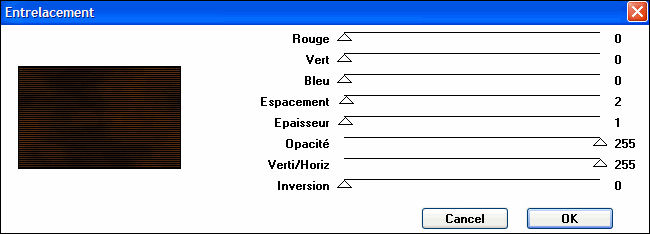
Effects - Filter Effects -Jeux de lignes:
Entrelacement:
3. Activate the tube-layer in the Layers palette.
Effects - 3D Effects - Drop shadow:
5 / 5 / 80 / 6 / color black.
Repeat with V & H -5.
Layers - Merge- - Merge All.
Image - Resize: 85%
Adjust - Sharpness - Sharpen.
4. Add borders:
1 pixel - background color;
10 pixels - white.
Minimize this first canvas for now.
5. Open a new transparent canvas, size 750 x 550
pixels.
Fill with the background color.
Add a new layer.
Fill with the foreground color.
6. Layers - Load/Save Mask - Load Mask From Disk:
'hjr_sigma'
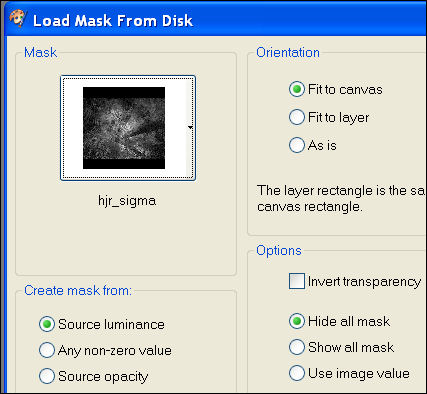
Apply.
Merge group.
7.Open the tube 'Susan T3352'.
Adjust - Hue and Saturation - Colorize:
Hue 23 / Saturation 179
Edit - Copy
Edit - Paste as new layer.
8. Image - Rotate - Free Rotate: 45 / Left.
Move the tube to the top left corner.
9. Effects - Filter Effects - Transparency -
Eliminate White
10. Copy and paste the first canvas now
as a new layer onto the second canvas.
11. Effects 3D Effects - Drop shadow:
5 / 5 / 100 / 6 / color black.
Repeat with -5.
Activate the postcard-layer in the Layers palette.
12.Open the Nadine tube.
Image - Mirror.
Copy and paste as a new layer onto the canvas.
Activate the Deformation Tool.
Drag the image out so that the beach and palm
trees become visible.
13. Layers - Merge - Merge All.
14. Open scrap 532
Edit - Copy.
Edit - Paste as a new layer onto the canvas.
Move it to the left.
15. Open scrap 'nietje'
Edit - Copy.
Edit - Paste as a new layer onto the canvas.
Arrange it underneath each other.
16.Open hjr_hearts
Edit - Copy.
Edit - Paste as a new layer onto the canvas.
Move it into position.
17.Open tube Summer Greetings-Vika
Edit - Copy.
Edit - Paste as a new layer onto the canvas.
Move it to the bottom-right.
18. Layers - Merge - Merge All.
19. Image - Add Border:
1 pixel - white;
25 pixels - background color.
Select with the Magic Wand.
Add a new layer.
Fill with white.
Effects - Filters Unlimited - Edges Square -
Square Edge 17.
Adjust - Sharpness - Sharpen.
Adjust - Sharpness - Sharpen More.
Selections - Select none.
20. Layers - Merge - Merge All.
21. Add your name.
Finished :-)
Groetjes Vika
Juni 2007
********************

Email
Maggie
at Magstags
Email
Vika
Website design and management by
©Magstags |