|
~*~ See Me ~*~
Vika's original Dutch tutorials
can be viewed here
Terms
of
Use
None
of the
images
used
in
these
tutorials,
which is offered for download in the zip files,
nor the tutorial results may
be
used
for
any
commercial
purposes
in
any form whatsoever
!!
The
copyright
remains
with
the
original
artists
and
are
protected
by
international
copyright
laws.
Artwork used in the tutorials is used for
educational purposes only.
Copyright of the tag design remains solely with
the tutorial writer.
You cannot claim the tag design or tag results as
your own or sell it as your own.
You cannot sell the images used in the tutorials
as part of a web design or web sets or anything
else.
NOTHING CAN BE SOLD!!
Kindly report any illegal sale of the tutorial
results or material to
Maggie
Magstags
Download the supplies
here
The zip contains brushes, mask, tube
and a scrap collections obtained from
Scrappy Expressions
***
FILTERS NEEDED:
None
***
Save everything in the folders before you begin.
Color palette:
Foreground color: #fffcd9
Background: #e5bc64.
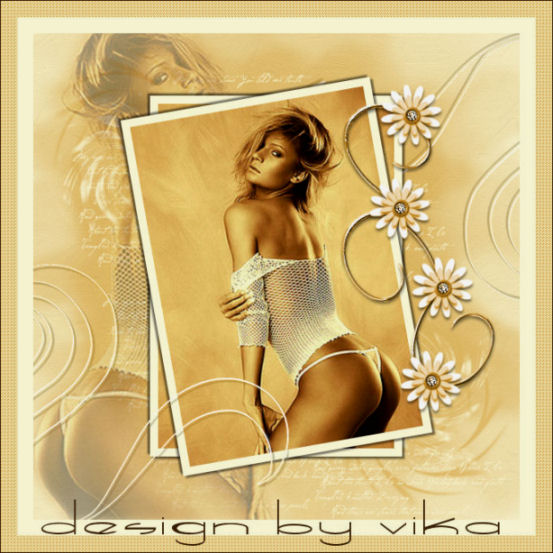
1. Open a new transparent canvas, size 600 x 600
pixels.
Fill with the foreground color.
2.Layers - new raster layer.
Fill with the background color.
3. Selections - Load/Save Mask - Load Mask From
Disk:
'dsmk0014'
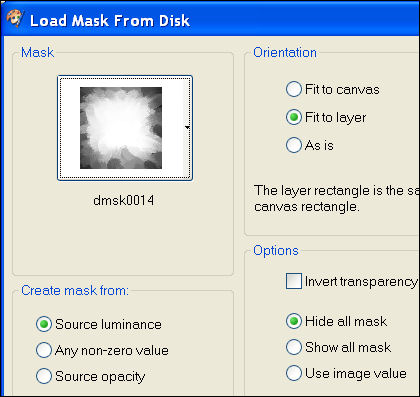
Layers - Merge - Merge Group.
4.Effects - Artistic Effects - Brushstrokes:
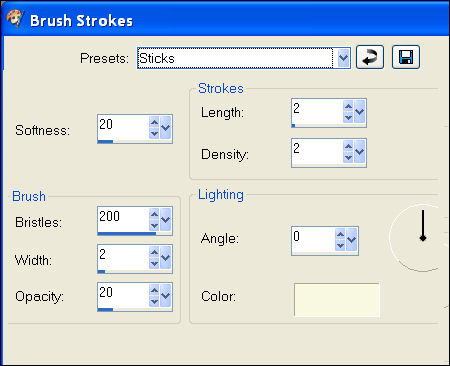
Repeat 1x.
5. Open the background image 'jbm03'.
Duplicate with shift D.
Minimize the duplicated image.
The other copy: Add a 10 pixels border
in the foreground color.
Copy and paste as a new layer onto the canvas
Effects - 3D Effects - Drop shadow:
3 / 3 / 50 / 3 / black.
Repeat with V&H on -3.
Layers - Duplicate.
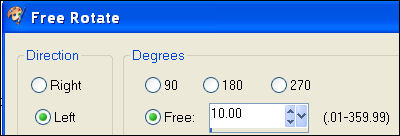
Image - Rotate - free Rotate:
10 / Left:
6. Activate the group raster 2 in the Layers
palette
(it is the masked layer).
7.Layers - new raster layer.
8. Activate your Brush tool and find the brush
'Pinwheel 001'.
Apply the brush in your background color to the
canvas:
Once in the top left corner and
once in the bottom right corner.
Find the brush 'PinwheelFun 001'.
Apply it in the foreground color to the bottom
right corner.
Find the brush 'lynd04-042 002'.
Apply the text in the foreground color
around the tube.
9.Open the duplicated image that was minimized.
Image - Mirror.
Activate your Selection tool: Freehand:

Select tightly around the woman and double-click
when you are finished.
You will see the ants marching now :)
Edit - Copy.
Edit - Paste as new image.
You will notice that a part of the arm should be
deleted.
Use the lasso tool again to select the area that
must be deleted.
Selections - Select none.
Image - Resize 115%.
Repeat another two times.
Copy and paste as a new layer onto the canvas.
Move it to the left.
Change the layer opacity to 34
in the Layers palette.
10. Open the tube 'vorm'.
Copy and paste as a new layer onto the canvas.
Move it to the top right.
Change the Blend mode to 'Luminance(Legacy)'
in the Layers palette.
11. Layers - Merge - Merge All.
12. Activate the 'vorm'- tube again.
Image - Mirror.
Image - Flip.
Copy and paste as a new layer onto the canvas.
Change the Blend mode to 'Luminance(Legacy)'
in the Layers palette.
13.Open the scrapkit 'SE Flowersbloom'.
Find the 'FloralAccent'.
Adjust - Hue and Saturation - Colorize:
28 / 182.
Copy and paste as a new layer onto the canvas.
Image - Rotate - Free Rotate:
with the same settings as before.
Move the tube against the edge of the canvas.
14. Layers - Merge - Merge All.
15. Image - Add Borders:
20 pixels - foreground color
20 pixels - background color
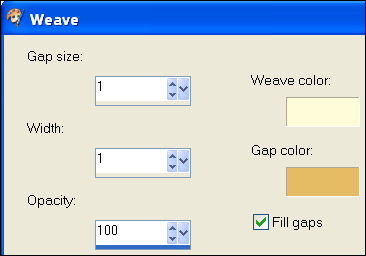
Select with the Magic Wand.
Effects - Texture Effects - Weave:
Add a 1 pixel border in color #3f2509.
Selections - Select None.
16. You can add your name now.
The font " Speed Bowling" was used
in the tag example.
Have fun ! :)
********************

Email
Maggie
at Magstags
Email
Vika

Website design and management by
©Magstags
Home |
Filter links |
PSP Goodies |