|
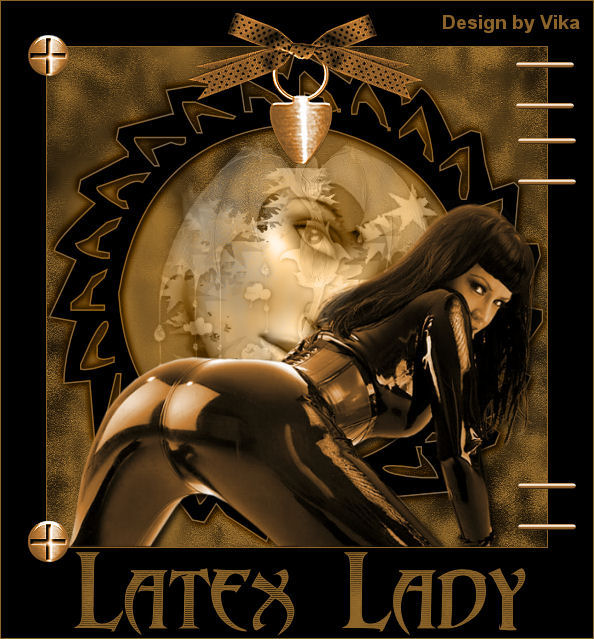
~*~ Latex Lady ~*~
Vika's original Dutch tutorials
can be viewed
here
Terms
of
Use
None
of the
images
used
in
these
tutorials,
which is offered for download in the zip files,
nor the tutoTerms
of
Use
None
of the
images
used
in
these
tutorials,
which is offered for download in the zip files,
nor the tutorial results may
be
used
for
any
commercial
purposes
in
any form whatsoever
!!
The
copyright
remains
with
the
original
artists
and
are
protected
by
international
copyright
laws.
Artwork used in the tutorials is used for
educational purposes only.
Copyright of the tag design remains solely with
the tutorial writer.
You cannot claim the tag design or tag results as
your own or sell it as your own.
You cannot sell the images used in the tutorials
as part of a web design or web sets or anything
else.
NOTHING CAN BE SOLD!!
Kindly report any illegal sale of the tutorial
results or material to
Maggie
Magstags
Download the supplies
here
***
FILTERS NEEDED:
None
***
Change the foreground color to #8c6429,
background color to black.
1.Open the background image ' papelantigo'.
Duplicate this image with Shift+D
and minimize the original.
2. Activate the Preset Shapes Tool and find the
'pspfun8'- shape:

Draw the shape onto your image.
Convert the vector layer into raster layer.
Effects - 3D Effects - Drop Shadow:
3 / 3 / 80 / 8 / color black.
Repeat with V & H on -3.
Click with the Magic wand in the center of the
circle.
3.Open @ template 196
Edit - Copy
Edit - Paste into selection
Change the Blend mode of this layer to
'Luminance(Legacy)' in the Layers palette.
4. Selections - Select None
5.Layers - Merge - Merge All
6.Open tube IDI-BlkLatex2
Adjust - Hue and Saturation - Colorize (or Shift
+L):

Edit - Copy
Edit - Paste as a new layer onto the canvas
Image - Resize to 85%
'Resize All Layers' = NOT CHECKED! :)
Move the tube to the bottom of the canvas.
7. Effects - 3D Effects - Drop Shadow
8. Layers - Merge - Merge All
9. Image - Add Border:
1 pixel foreground color.
Image - Add Border: 'Symmetric' = not checked:
Top, Left, Right - 45
Bottom - 90.
10. Open de striktube
Image - Resize to 85%
Edit - Copy
Edit - Paste as a new layer onto the canvas
Adjust - Sharpness - Sharpen
Adjust - Sharpness - Sharpen More
11.Open the button tube
Edit - Copy
Edit - Paste as a new layer onto the canvas
Move it to the bottom left.
Repeat 1x.
Move it to the top left.
Layers - Merge - Merge Down
Adjust - Sharpness - Sharpen
12.Open the nietjes tube
Edit - Copy
Edit - Paste as a new layer onto the canvas
Repeat 3x.
Look at the example tag to see where it should all
be positioned.
13.Layers - Merge - Merge All
14.Open 'Abaddon'- font:

Change the background color to pattern
and find your pattern(background image)
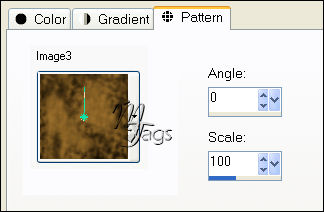
Type 'Latex Lady'.
Draw the letters out as seen in the example.
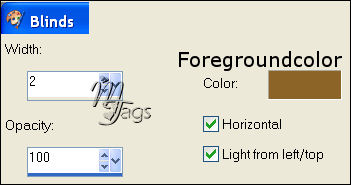
Convert the vector layer to raster layer in the
Layers palette.
Effects - Texture Effects - Blinds:
Add your name.
15. Layers - Merge - Merge All
Image - Add Borders:
1 pixel foreground color
********************
Vika
Februari 2007

Email
Maggie
at Magstags
Email
Vika
Translated 30th May 2007

Website design and management by
©Magstags
Home |
Filter links |
PSP Goodies |