|
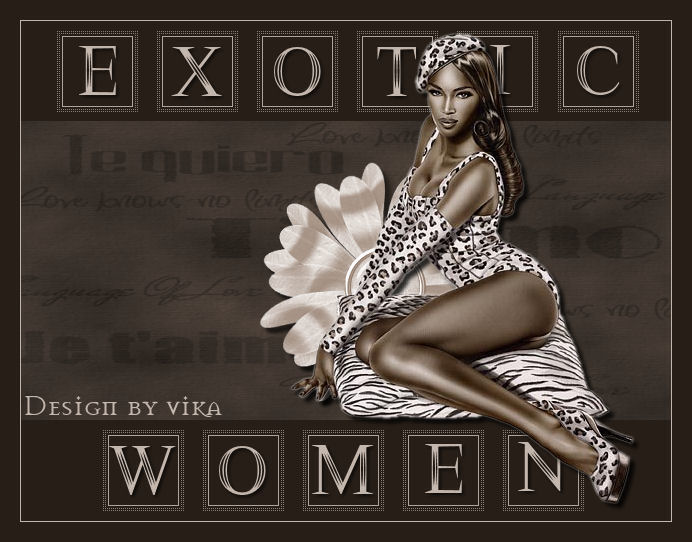
~*~ Exotic Woman ~*~
Vika's original Dutch tutorials
can be viewed
here
Terms
of
Use
None
of the
images
used
in
these
tutorials,
which is offered for download in the zip files,
nor the tutorial results may
be
used
for
any
commercial
purposes
in
any form whatsoever
!!
The
copyright
remains
with
the
original
artists
and
are
protected
by
international
copyright
laws.
Artwork used in the tutorials is used for
educational purposes only.
Copyright of the tag design remains solely with
the tutorial writer.
You cannot claim the tag design or tag results as
your own or sell it as your own.
You cannot sell the images used in the tutorials
as part of a web design or web sets or anything
else.
NOTHING CAN BE SOLD!!
Kindly report any illegal sale of the tutorial
results or material to
Maggie
Magstags
Download the supplies
here
***
FILTERS NEEDED:
None
***
Change the foreground color to #c467ae,
background color to #271e17.
1.Open a new transparent canvas, size 650-500.
Fill with the background color.
2. Add a new raster layer
Selections - Load/Save Selection - Load Selection
From Disk:
find 'exotic-Vika' and apply.
3.Open the background image 'Montilove'.
Edit - Copy
Edit - Paste into selection.
Adjust - Hue and Saturation - Colorize (or Shift
+L):
Hue - 18
Saturation - 41
Selections - Select None.
4. Layers - Merge - Merge All
5.Open tube lyndiebrush 154008-6
Edit - Copy.
Edit - Paste as a new layer onto the canvas.
Drag the tube to the top of the canvas.
6.Open tube lyndiebrush 154008-5
Edit - Copy
Edit - Paste as a new layer onto the canvas.
Drag the tube to the bottom of the canvas.
7.Open tube Sara Horwath,
activate the tube layer in the Layers palette.
Edit - Copy
Edit - Paste as a new layer onto the canvas
Effects - 3D Effects - Drop Shadow:
5 / 5 / 80 / 5 / black.
Open tube SE_SpecialLove_Scrap Flow
Adjust - Hue and Saturation - Colorize -same
settings.
Edit - Copy
Edit - Paste as a new layer onto the canvas
Layers - Arrange - Move Down.
Repeat the same drop shadow.
Shift the flower a little bit to the right.
8. Open the 'Morrison'- font:Apply with:
Size 72, line width 1.
Invert the fore-and background colors in the Color
palette
and lock the background color.

Type the letters 'EXOTIC' in uppercase in the top
brush blocks.
TIP: Type the first letter and click on 'apply'.
Move it into position while the marching ants is
still around it.
Selections - Select None.
Now type the second letter, click 'apply' and move
it into
position as well, before deselecting it.
This way you do not have to type each letter on a
new layer :)
Effects - 3D Effects - Drop Shadow:
2 / 2 / 80 / 5 / black.
Type 'WOMAN' in uppercase
in the lower brush blocks.
Repeat the same drop shadow.
9. Layers - Merge - Merge All
10. Image - Add borders:(Symmetric = checked)
1 pixel light color
20 pixels dark color
Add your name and you are finished! :)
********************
Groetjes Vika
Februari 2007

Email
Maggie
at Magstags
Email
Vika
Translated 30th May 2007

Website design and management by
©Magstags
Home |
Filter links |
PSP Goodies |