|
*~* Forever *~*
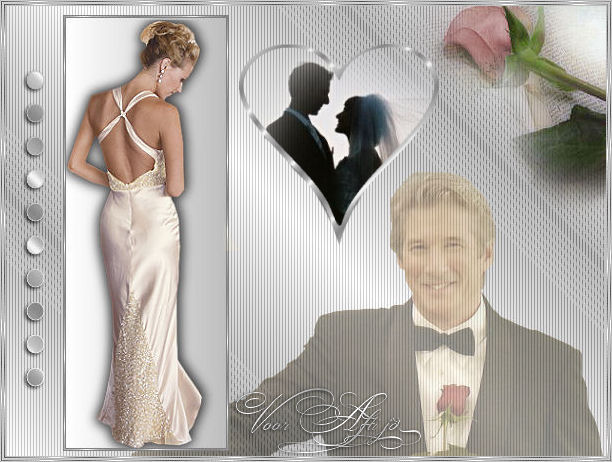
Click on the image to view the working script.
Here you can find
Jeanette' s original Dutch tutorial.
***
MATERIALS NEEDED:
Supplies
here.
The beautiful tubes were made by Lelanie, SDH and Linda
Filter: Two Moon.
*** Change your foreground color #BFBFBF,
background to white.
Change the foreground to gradient
with these settings:
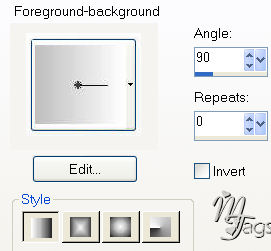
1.Open a new vanvas, size 160x430px.
Fill with the gradient.
2. Open the lady tube.
Copy and paste onto the canvas.
3.
Effects -- 3D Effects -- Drop Shadow: 2 -2 70 15,00.
4. Merge layers.
5. Add a 1px black border.
Select with your Magic Wand
and fill with a silver pattern.
6. Add a 1px border in your foreground color.
7. Repeat step 5.
8. Image -- Mirror.
9. Change your gradient to look like this:
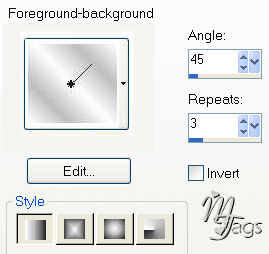
10. Open a new transparent canvas, size 600x450px.
Fill with the gradient.
11. Add a new layer and fill with the gradient as
well.
Apply the filter effect: Two Moon -- Wish it would
rain,
with these settings:
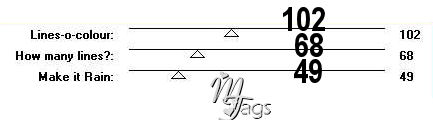
13. Reduce the opacity of this layer to 50%
in your Layers palette.
Merge all layers visible.
14. Copy and paste the lady tube again on the
bigger background canvas.
15. Open the man tube.
Copy and paste onto the canvas.
Position it at the bottom.
Move this layer to the bottom
in your Layers palette.
Reduce the opacity of this layer to 50%
in your Layers palette.
16. Open the flower tube.
Copy and paste onto the canvas.
Position it in the top right corner.
17. Open
the heart tube.
Copy and paste onto the canvas.
Merge layers visible.
18. Activate your Text tool.
Choose the ' Bookman Old Style' font, size 72.
Your foreground should not be locked.
your background color should be on the silver pattern.
19. Type 10 dots.
Image -- Rotate -- Free Rotate -- 90 degrees to the
left.
20. Shift it to the right.
Effects -- 3D Effects -- Drop Shadow: 2
-2 70 5,00.
Deselect.
Merge layers.
21. Lock your foreground color.
Add some more text.
22. Deselect.
Merge all layers visible.
23. Add borders:
1px in foreground color;
1px in silver;
2px
in foreground color;
1px in silver;
1px in foreground color.
Deselect.
The tag is finished.
All materials needed for the script are
in the zip file.
Have fun !!
Download
the empty script

BACK
If you liked Jeanette's tutorial please
be so kind and write
a message in her
guestbook.
Translated on 18th June 2006

The graphic design of this page is
copyrighted to Magstags.
Home |
Filter Links |
Email|Terms Of Use
|