|
Wild Five of Africa
92
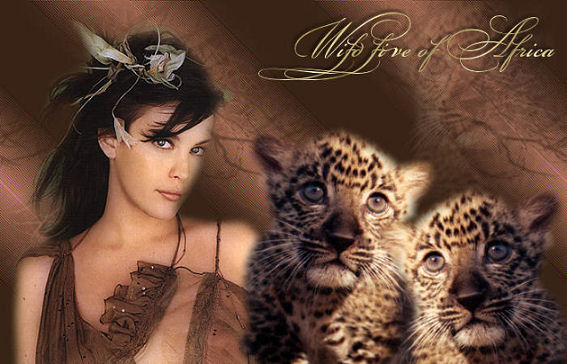
Click on the image to view the working
script.
View Jeanette's original Dutch tutorial
here.
***
Download the supplies
here.
Crystal tubed the lady;
Mariel
tubed the cheetah
and the
brush is
Yoka's
- save it in your Brush Folder.
A
cheetah-gif from Jax is also included
in the
zip.
Don't
open it in PSP!!
No filters needed.
Change
the foreground color to #3A2417,
background to
#B4765C.
Make a
foreground background gradient:
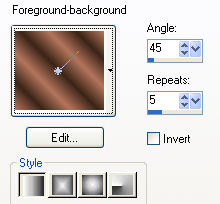
1. Open
a new transparent image, size 700x450px.
Fill
with the gradient.
2. Effects
-- Edge Effects -- Enhance More.
Repeat
1x.
3.
Change the foreground back to color (no more on gradient).
4.
Activate the Brush Tool.
Find
Yoka's takken.
Click
with the left mouse button
in the
upper right corner of the canvas.
Click
on the lower rigth corner.
5.
Image -- Mirror.
Repeat
step 4.
Image
-- Mirror.
6. Effects
-- Image Effects -- Seamless tiling:
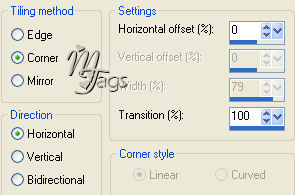
7. Open
the lady tube.
Copy
and paste onto the canvas.
Position it about half a centimeter form the edge of the canvas.
8. Open
the cheetah tube.
Copy
and paste onto the canvas.
Repeat
1x and mirror this layer.
Position it nicely together.
9. Open
the cheetah tube again and select more or less
as seen
in the image below:
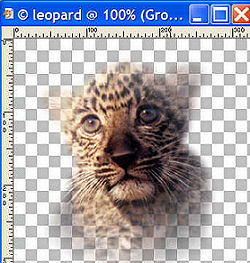
10.
Layers -- Load/ Save Mask -- Load Mask from Disk.
Find
the 20/20 Mask and apply.
Merge
Group.
Click
'yes' to the pop-up question.
11.
Copy and paste onto the canvas.
Position it in the upper right corner.
Reduce
the opacity of this layer to 20%.
Merge
all layers visible.
12.
Lock the foreground color.
Change
the background color to the gold pattern.
Apply
your text in a font of your choice.
13. Effects
-- 3d Effects -- Drop Shadow:
3 3
70 5,00.
Sharpen
1x.
Deselect ( Ctrl +D)
Merge
all layers.
If you
don't want to use the script, you
can
apply a border now.
Your
tag is finished.
You
will need an additional 2 background tiles as well as the
cheetah-gif (in zip) if you're
going
to use the script.
Have
fun !!
Download the empty script here.

BACK

If you enjoy Jeanette's tutorial please be so kind and write
a message in her guestbook.
Translated on 10th March 2006

The graphic design of this page is copyrighted to Magstags.
Home |
Filter Links |
Email|Terms Of
Use
|