MATERIALS NEEDED:
Download the supplies
here
FILTERS NEEDED
Filter Graphics Plus.
Filter Flaming Pear-[Transline - included in
the zip].

METHOD:
Open the tube and choose 2 color.
Foreground - light color.
Background - dark color.
Make a gradient.
Angle - 28
Repeats - 0
Invert - not checked
Style - Linear.
Open a new transparent image, size 400 x 350px.
Floodfill with the gradient.
Invert the gradient.
Add a new raster layer.
Floodfill with the inverted gradient.
Effects -- Geometric Effects -- Skew.
Apply with these settings:
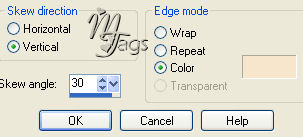
Apply Effects -- Filter Effects -- Flaming Pear - Transline
Activate your tube.
Copy and paste as a new layer.
Lock raster layer 1.
Highlight raster layer 3.
Layers -- Merge -- Merge Visible.
Reduce the opacity to 80%.
Selections -- Select All .
Selections -- Modify -- Contract by 2 px.
Go to Effects -- 3D Effects -- Chisel
with defaul settings - color black.
Merge layers.
Duplicate this layer.
Reduce size to 75%
'Resize All Layers' unchecked.
Activate raster layer 1.
Effects -- Filter Effects -- Graphic
Plus -- Cross Shadow.
All slidebars on 50.
Activate the merged layer.
Repeat the same Cross Shadow effect.
Lock raster 1.
Shift the copy to the right.
See example.

Unlock raster 1.
Layers -- Merge -- Merge All.
Activate the 'script-Lisa' image.
Copy and paste as a new layer.
Position it.
You can colorize it if you want to.
Effects -- 3D Effects -- Drop Shadow.
1-1-100-1 black.
Add your name to the tag
in a font of your choice.
You're finished :)
Here is another example: