Materials:
A background or wallpaper size 600-450 pixels
A quote or saying of your choice
Two images/tubes: one vertical and one horizontal
Mask 20-20.
Lisa's supplies:
Download here
Filter:I-Decay
Download here
METHOD:
Open the wallpaper or image.
Select all - Modify by 30 and invert.
Adjust-- Blur-- Gausian Blur--17--Invert.
Effects -- 3D Effects-- Chisel-- Size 2--black.
Keep selected
Effects Filter I-Decay--Radial
Diffuse,
with these settings:

Deselect.
Minimize this image for now.
Open the horizontal image of your choice.
Promote background layer in your Layers
palette.
Layers-- New Mask Layer --
Load Mask from Disk-- Mask
20-20--apply.
Layers -- Merge -- Merge Group
Layers -- Merge -- Merge All.
Repeat this with your other image.
If the images are big, resize and minimize
it for now.
Activate the big canvas. We will proceed with it now.
Copy your masked image and paste as a new
layer.
Position is where your want it.
Reduce the opacity of this layer to 60%
in your layers palette.
Activate the vertical image,
Copy and paste as new layer onto the big
canvas.
Change the opacity of this layer to 55%.
Layers -- Merge -- Merge All.
Add a new raster layer.
Activate your quote-tube
Copy and Paste as new layer.
Add a new raster layer
and add a name on it.
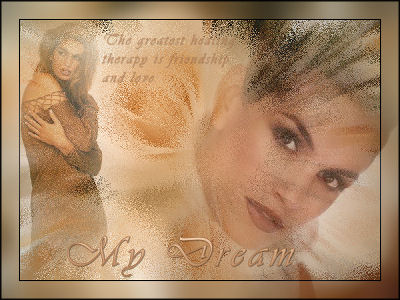
I named it "My Dream".
Effects--3D Effects-- Drop Shadow.
Vertical and Horizontal on 1
Opacity on 36
Blur on 1.00
Color black
Finally -- Effects -- 3D Effects -- Buttonize,
with these settings:
Height and Width = 2
Opacity = 75
Border = solid
Color = black.
Reduce the size of your image to 350 or 400 pixels.