Materials:
A Tube
Filter Eye Candy 4000
Filter Bordermania
A Corner
Supplies:
Download here
Filter Eye Candy 4000
Filter Bordermania
Download here

Method
Open your tube and choose 2 colors:
light color for the foreground
dark color for the
background
Make a gradient.
Angle 0
Repeats 0
Invert not checked
Style linear.
You can change the
gradient as you prefer it.
Minimize the tube for now.
Open a new transparent canvas of 500-500 pixels.
Fill the canvas with the gradient.
Adjust-- Add/ Remove Noise --10
--gausian--monochrome--
checked.
Click on the image and activate
your ruler
Click on your Pen Tool,
with these settings:



Position your Pen tool at 80(on the rule) at the top
Left should be on 80 as well.
Draw a line to 250 and pan
with your mouse tool on the arrow.
Now you should have a nice
line.
Convert the vector layer to raster layer.
Effects -- 3D Effects --
Drop Shadow
with these settings:
Vertical = 1
Horizontal = 0
Opacity = 100
Blur = 7.00
Color = black.
Layer [raster] -- duplicate.
Image--Rotate--Free Rotate: 90 / Left.
Position it at the top at 120-- left 140.
Drag it around to form a
nice corner
where you like it.
I disabled my ruler - it's
your own choice.
Now your must note very carefully.
Lock layer 1.
Activate Layer 2 + the
copy and merge visible.
Duplicate the merged layer
Reduce the size of this
layer to 85%
Drag it to the bottom, as
seen in my
tag example
Open layer 1 again.
Activate your tube
and resize it to fit your
canvas.
Paste as new layer onto
the canvas.
Move it slightly to the
center.
Effects -- 3D Effects --
Drop Shadow,
the same as before.
Effects -- Filters -- Eye Candy 4000--
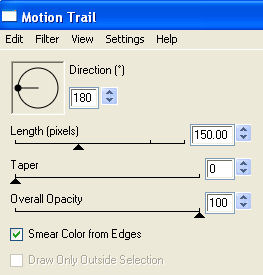
Drag layer 2 below the merged layer in your layers palette.
Now note carefully:
Duplicate this merged
layer.
Image -- Mirror
Image -- Flip
Open your corner
and colorize to compliment
your image.
Paste as new image.
I assume that you know how
to colorize the corner.
Position the corners as in my tag example.
Layers -- Merge -- Merge All.
Reduce the image to 350 pixels or 70%
Add you name in a nice
font.
Effects--Filters -- Bordermania--Ripple,
with these settings:
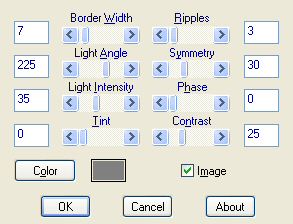
Your tag is finished.
I hope you enjoyed this
tutorial.
Here is another example.