Materials:
A Tube or image, size 292-350.
A Font.
Supplies:
Download here
FILTERS NEEDED:
DSB Flux
Simple fILTERS
Filter MuRa's Seamless
Download here

METHOD:
Open a tube and choose 2 colors.
Foreground = light color.
Background = dark color.
Make a gradient:
Angle 0
Repeats 0
Invert not checked
Style Linear.
Apply the Mask 20-20 to your tube or
image before you use it.
Minimize the tube for now.
Open a new transparent canvas 400-350 pixels.
Fill the canvas with your light color.
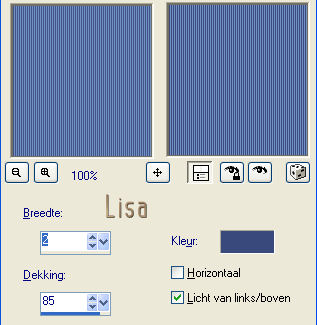
Effects-- Texture Effects -- Blinds,
with these settings:
Layers -- New raster layer
Fill with your gradient.
Effects-- Image--Resize --90%,
"resize all layers" NOT CHECKED
Duplicate this layer--resize again to 80%.
Activate layer 2
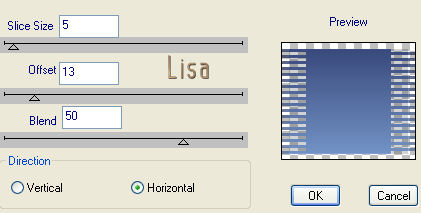
Effects -- Filters -- DSB Flux--Linear Transmission,
with these settings:
Activate the duplicate layer
and repeat the DSB Flux effect.
On this same layer: apply the Simple Filters -- Quick Tile
effect.
Layers -- Merge -- Merge All.
Activate your tube
and resize to fit your canvas.
Paste as new layer onto the canvas.
Duplicate this layer and lock it.
Activate your tube layer --
Adjust -- Blur -- Gausian Blur on 15.
Unlock the duplicated layer and activate.
Image -- Resize to 75% --
"resize all layers" NOT CHECKED.
Drag it slightly to the bottom, or where
you want it.
Layers -- New Raster Layer.
Add your name in a nice font.
I chose the 'ComputerAmok'- font, size 26.
Effects -- Filters -- MuRa's Seamless--
Emboss at Alpha--standard.
Layers -- Merge -- Merge All.
Select All -- Modify -- Contract by 10 pixels
Effects--3D Effects-- Cut Out-0-0-100-13.
Deselect.
Select All--repeat the Cut Out effect:-0-0-100-13.
Your tag is finished :-)
Here is another example.