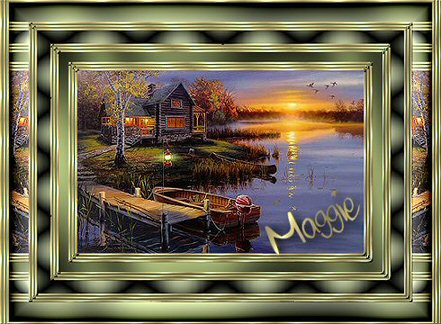
Distortion Frame

The
Distortion Frame Tuturial was done in PSP 8

MATERIALS NEEDED:
-
A tube /
image of your choice, preferably with dark
colors.
-
A
corner
-
Gold
pattern
FILTERS NEEDED:
Filters Unlimited
Graphic Plus.
-
Filters Unlimited 2.0
-
Graphic Plus
Method
Choose two
colors from your image>
one light, one dark
color.
-
Add a 3 pixel white
border.
Select and fill with the gold
pattern.
Effects -- 3D Effects --
Inner Bevel
with these settings
below.
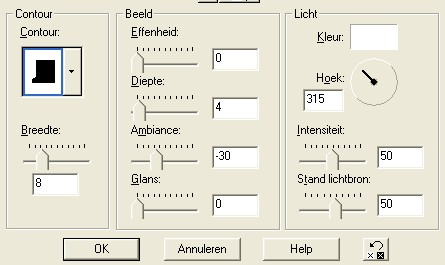
-
Add a 2 pixel border with the
dark color.
-
Add a 3 pixel white
border, select with Magic Wand,
fill with gold pattern,
and
apply the same Inner Bevel as in step 1.
-
Add a 2 pixel border with
the dark color.
-
Add a 3 pixel , white
border, and repeat step 1.
-
Add a 15 pixel border in
the dark color.
Select.
Go to Filters --filter
Graphics plus -- Cross Shadow -- with standard
settings.
-
Repeat steps 1 to
5.
-
Add a 20 pixel border
with the light color.
Select.
Go to Effects -- Filters Unlimited -- Special Effects 1 -
Black Net, with both settings on 21, as seen
below.
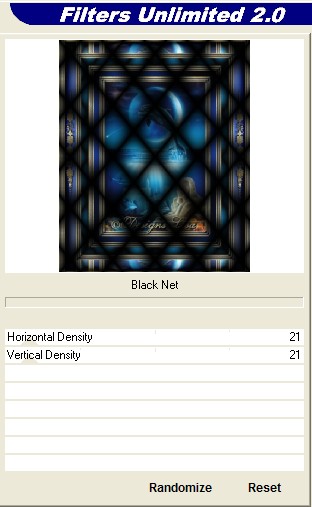
-
Repeat steps 1 to
5.
-
Add a border of 30 pixels
with the dark color.
Select with the Magic Wand.
Go to
Effects -- Filters Unlimited --
Tile&mirror -- Distortion Mirror(vertical), as seen
below.
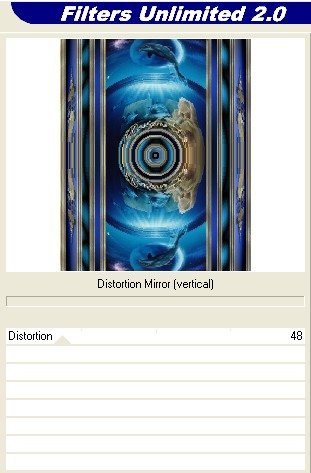
Deselect.
Select the dark borders with the Magic Wand
(Shift
key pressed in) and apply the Graphics Plus Cross Shadow as in
Step 6.
Select All -- Modify --
Contract by 30 pixels.
Invert.
Filter Unlimited --
buttons&frames -- flower glasframe -- standard settings.
-
Add a 3 pixel white
border.
Select with Magic Wand and fill with the gold
pattern.
Now you must add
another 2 pixel border with the dark color, BUT, UNCHECK the
"Symmetric" option, set the "Left" and "Right" setting to
2, the "Top" and "Bottom" settings to 0, as seen
below.
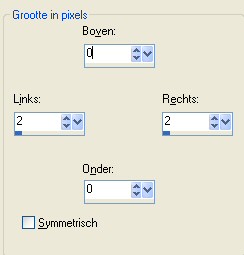
Add another 3
pixel white border
(keep the "Symmetric"option unchecked),
"Left" and "Right" will be 3.
"Top" and "Bottom" will be 0.
Select the left and right sides with the Magid Wand,
Shift-key pressed down, and fill with the gold pattern.
Apply the same Inner Bevel as before.
Add another 2 pixel border with the dark color
(
"Symmetric option unchecked).
Add a 3 pixel white border (
Symmetric still unchecked). Select the two sides with the
magic wand.
Fill with the gold pattern.
If everything went
well, you will have 3 gold stripes on the left and right of
your frame now.
-
Add your decoration as a
new layers.
Duplicate the layer.
Image - Mirror.
Duplicate.
Place in position.
-
Merge All layers and add your name or
watermark.
Another example:
|