|
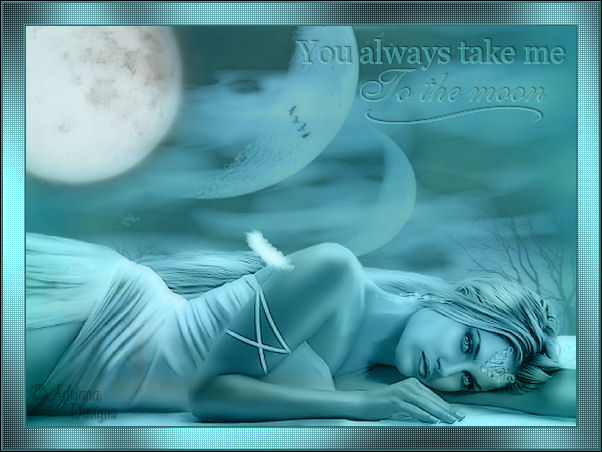
~*~ You Always Take
Me To The Moon~*~
Adriana's original
Dutch tutorial can be viewed
here
This tutorial was written on
20-10-2006 for Psp 9.
TERMS
OF USE
Download the
supplies
here.
If you want to share these tubes,
please keep the filenames intact
and respect their work.
|
FILTERS
NEEDED:
*Mura's Meister
*Xero
*Border Mania
*Greg's Factory Output 2
*Penta com |
Find
the filters
here.
METHOD
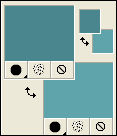
The Color Palette:
Foreground color: #49868d
Background color: #5fa3ab
Open a new transparent canvas: 550 x
400 pixels.
Effects - Filter Effects - Mura's
Meister: Cloud:
100 / 100 / 3 / and the rest on
0.
Open the tube 'Raz 2006_Misted_Mystic
Moons' .
Copy and paste as a new layer onto the
canvas.
Use the Deformation tool to drag the
image out
over the canvas so that it covers the
canvas completely
as seen in the example.
Open the tube ' Kmoon' .
Copy and paste as a new layer onto the
canvas.
Move it to the top left corner.
Change the layer opacity to 80%
in the Layers palette.
Layers - Merge - Merge All.
Effects - Filter Effects - Filter
Unlimited 2:
Image Enchancement, Color Booster: 50.
Open the tube ' SKF-Beauty' .
Copy and paste as a new layer onto the
canvas.
Move it to the bottom.
Change the Blend Mode of the layer to
'Luminance(Legacy)'
in the Layers palette.
Layer opacity: 90%.
Layers - Merge - Merge All.
Effects - Filter Effects - Xero:
Porcelain
with these settings: 50 / 128 / 128 /
bottom two on 0.
Add a new raster layer.
Change the foreground color to
#2e6e70.
Activate the Brush Tool.
Find the Brush 'You always take me to
the moon'.
(Remove Adriana' s watermark first)
Apply 2x onto the canvas.
Change the Blend mode of the layer to
' Lighten'.
Effects - 3D Effects - Drop Shadow:
-1 / 1 / 50 / 2 / black / shadow on new layer = checked.
Image: Add borders:
3 pixels - color black.
Select with the Magic Wand.
Fill with the foreground color.
Keep selected.
Effects - Filter Effects -
Bordermania: Frame 2,
with these settings: 3 / 3 / 110 /
130.
' North Corners' = checked.
Selections - Select None.
Image - Add Borders:
20 pixels - any color except blue.
Fill with the background color.
Keep selected.
Effects - Filter Effects - Gregs
Factory Output Vol 2: Pool shadow -
standard.
( All slidebars on 50, except the last
2 on 128).
Keep selected.
Effects - Filter Effects - Penta.com:
color dot.
Settings:90 / 2 / 255 / 255 / 255.
Selections - Select None.
Image - Add Borders:
3 pixels.
Select with the Magic Wand.
Fill with the foreground color
#2e6e70.
Effects - Filter Effects - Bordermania
- standard.
Selections - Select None.
Add your name on a new layer.
Layers - Merge - Merge All.
Save as optimized jpg.
Have fun ! :)
©Adriana Designs.
This tutorials has
been registered at

Adriana:
Email

Magstags Home | Filter Links |
Email |
Terms of Use |