|
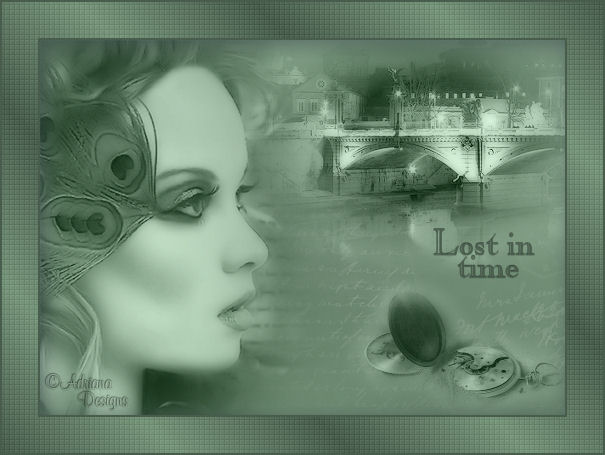
~*~ Lost in Time ~*~
Adriana's original
Dutch tutorial can be viewed
here
This tutorial
was written on
27-10-2006 for Psp 9.
TERMS
OF USE
Download the
supplies
here.
If you want to share the tubes,
please keep the filenames intact
and respect their work.
Export the brush ' LoveLetter'
to your Brush folder.
FILTERS
NEEDED:
Xero - Fritillary - find it
here
METHOD
The Color Palette:
Foreground color: #6a866f
Background color: #76947a

Make a gradient:
Style - Linear
Angle - 45
Repeats - 3
Fill the canvas with the gradient.
Adjust - Blur - Gaussian Blur: 20.
Layers - New Raster Layer.
Change the foreground color to #aebeb0.
Activate the Brush Tool.
Find the brush 'Loveletter'
and apply to the canvas.
Move it to the right
as seen in the example.
Change the layer opacity to 84%
in the Layers palette.
Open the tube 'Rome' .
Image - Mirror.
Image - Resize: 75%.
Copy and paste as a new layer onto the
canvas.
Move it to the top right corner.
Change the Blend Mode of the layer to
'Luminance (Legacy)'
in the Layers palette.
Layer opacity:90.
Open the tube ' SS_150'.
Image - Mirror.
Image - Resize: 85%.
Copy and paste as a new layer onto the
canvas.
Move it to the left.
Blend mode: 'Luminance (Legacy)'
Layer opacity: 70%.
Open the tube ' Time 1'.
Image - Resize: 35%
Copy and paste as a new layer onto the
canvas.
Move it to the bottom right.
Blend mode: 'Luminance (Legacy)'
Layer opacity: 78%.
Do the final arrangement of the images
on the canvas.
Layers - Merge - Merge All.
Effects - Filter Effects - Xero:
Porcelain,
with these settings:
50 / 128 / 128, bottom three slide bars
all on 0.
Adjust - Brightness and Contrast: 4 /
0.
Selections - Select All.
Layers - New raster layer.
Effects - 3D Effects - Cutout:
4 / 4 / 50 / 30 / color black.
Selections - Select None.
Change the foreground color to
#495d4d.
Make a gradient:
Style - Linear
Angle - 45
Repeats - 5
Image - Add Borders:
40 pixels - black.
Select with the Magic Wand
and fill with the gradient.
Adjust - Blur - Gaussian Blur: 20.
Effects - Filter Effects - Xero:
Fritillary: standard.
Selections - Select All.
Selections - Modify - Contract: 38
pixels.
Layers - New Raster Layer.
Fill with the foreground color.
Selections - Modify - Contract: 2
pixels.
Press ' delete' on your keyboard.
Selections - Select All.
Selections - Modify - Contract by 2.
Selections - Invert.
Fill with the foreground color.
Selections - Select None.
Layers - New Raster Layer.
Activate the Text tool.
Invert the fore- and background colors
in the color palette.
Lock the foreground color.
Choose a nice font
such as ' Caslonopenface BT'
type ' Lost in time' .
Effects - 3D Effects - Drop Shadow:
1 / 0 / 60 / 1 / black.
Selections - Select None.
Movie it into position.
Add your name on a new layer.
Layers - Merge - Merge All.
Save a optimized jpg.
Have fun!
©Adriana Designs.
This tutorials has
been registered at

Adriana:
Email


Magstags Home | Filter Links |
Email |
Terms of Use
|