|
~*~ Lady in Red ~*~
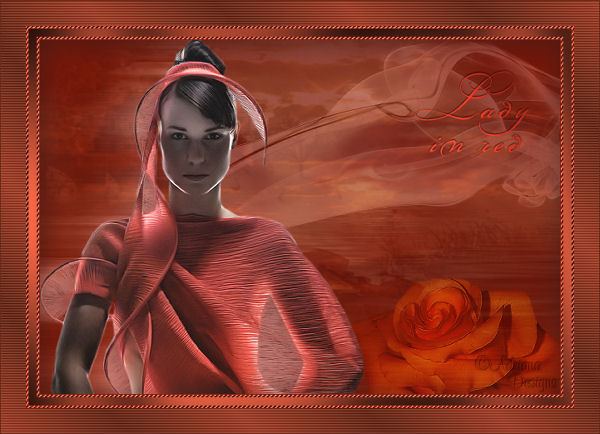
Adriana's original
Dutch tutorial can be viewed
here
TERMS
OF USE
This blend tutorial was written on
1-6-2007 for Psp 9.
Download the
supplies
here.
The tubes were made by
MarieL and
Suzi.
The background was made by Adriana.
If you want to share their tubes,
kindly keep the filenames intact.
Please respect their work.
FILTERS
NEEDED:
* Graphics Plus
* PhotoEffex |
Find
the filters
here.
METHOD
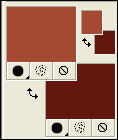
The Color Palette:
Foreground color: #a54930
Background color: #63170d
Open the Background: Lady in red,
Adriana Designs.
That will be the canvas.
Open the tube
'0717-05-amlrmist-angel01'.
Copy and paste as a new layer onto the
canvas.
Image - Mirror.
Image - Resize: 65% 'Resize all layer'
= not checked.
Move it to the bottom right
as seen in the example.
Change the Blend Mode of the layer to
'Hard light'
in the Layers palette.
Change the layer opacity to 60%.
in the Layers palette.
Open the tube 'MarieL_2006_smoke'.
Copy and paste as a new layer onto the
canvas.
Move it to the top right.
Change the Blend Mode of the layer to
'Luminance (Legacy)'
in the Layers palette.
Layer opacity: 80%.
Open the tube 'SS_1886'.
Copy and paste as a new layer onto the
canvas.
Image - Resize: 90%.
Adjust - Brightness and Contrast - 20
/ 0.
Move it to the left and a little down.
Duplicate this layer in the Layers
palette.
Effects - Distortion Effects -
Wind: Right / 100.
Change the Blend Mode of the layer to
'Luminance (Legacy)'
in the Layers palette.
Change the layer opacity to 62%.
in the Layers palette.
Layers - Arrange - Move Down.
Activate the Eraser Tool:
size 20 / Hardness 80 / Opacity 100
Activate raster layer 3. ( tube MarieL
)
Remove the parts at the woman's
neckline.
Layers - Merge - Merge All.
Selections - Select All.
Effects - 3D Effects - Cutout:
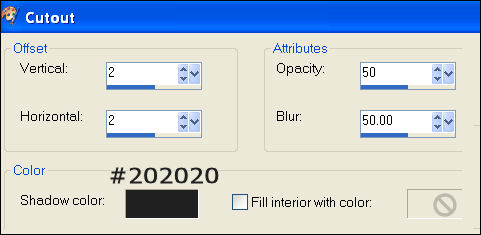
Selections - Select None.
Image - Add Borders:
1 pixel - color # 63170d.
* 1 *
Add border:
3 pixels - color white.
Select his border with the Magic Wand.

Fill with the foreground color.
Effects - Artistic Effects - Halftone:
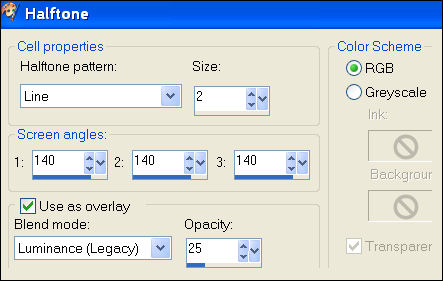
Effects - Edge Effects - Enhance.
Selections - Select None.
* * *
Image - Add Borders:
10 pixels - white.
Select with the Magic Wand.
Fill with the foreground color.
Effects- Filter Effects - Graphics
Plus: Cross Shadow.
Deselect.
Repeat Step * 1 *
Change the foreground color to
gradient:
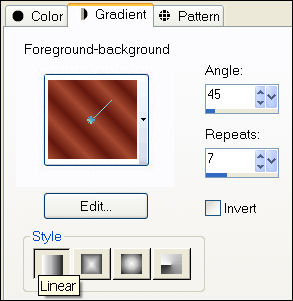
Add Borders:
30 pixels - white.
Select with the Magic wand
and fill with the gradient.
Adjust - Blur - Gaussian Blur: 10.
Effects - Filter Effects - PhotoEffex:
Scanlines.
Deselect.
Image - Add Borders:
1 pixel - color #63170d.
Copy and paste the text 'Lady in red'
onto the canvas.
Move it into position.
Add your name on a new raster layer.
Layers- Merge - Merge All.
Save as optimized jpg.
Have fun :)
©Adriana Designs.
This tutorials has
been registered at

Adriana:
Email

Magstags Home | Filter Links |
Email |
Terms of Use |