|
~*~ If you Walk Away ~*~
Adriana's original
Dutch tutorial can be viewed
here
TERMS
OF USE
This tutorial is written on 23-5-2007
for Psp 9.
Download the
supplies
here.
The tubes
were made by Angie,
Marcio
and Silke.
If you want to share their tubes,
kindly keep the filenames intact.
Please respect their work.
FILTERS
NEEDED:
Find
the filters
here
METHOD
The Color Palette:
Foreground color: #878c97
Background color:#444f5b

Open a new transparent canvas: 650 x
450 pixels.
Fill the canvas with the foreground
color.
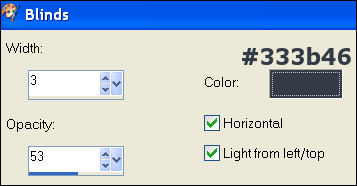
Effects - Texture Effects - Blinds:
Layers - New Raster layer.
Fill with the background color.
Layers - Load/Save Mask - Load Mask
From Disk:
( mask ' gh_grungeframe 3' )
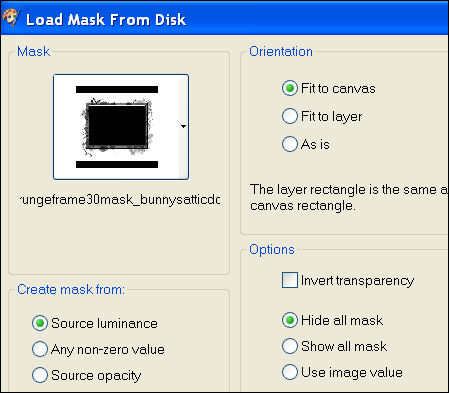
Layers - Merge - Merge Group.
Effects - Filter Effects - Unlimited
2.0,
Paper Texture - Japanese Paper: 40 /
87.
Layers - New Raster layer.
Activate the Brush tool
Find the brush ' hjr_haunted house 2'
,
Apply it with the background color in
the center.
Open the tube 'F-M2007-31'.
Copy and paste as a new layer onto the
canvas.
Adjust - Photo Fix - Digital Camera
Noise Removal
Move it to the left and a little up
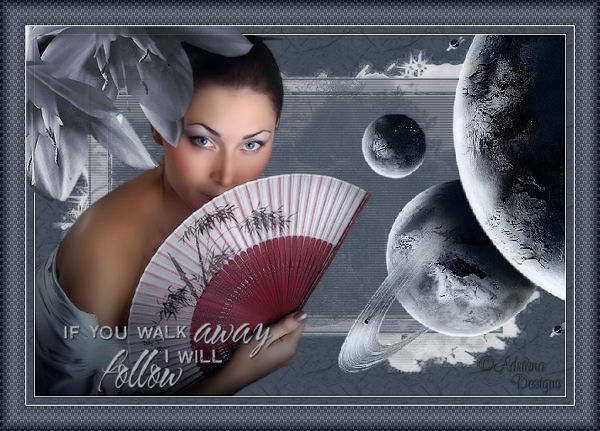
as seen in the example.
Open the tube 'SKF_Planets 215'.
Copy and paste as a new layer onto the
canvas.
Image - Mirror.
Image - Flip.
Image - Resize: 80% ' Resize all
layer' =not checked.
Move it to the top right.
Change the Blend Mode of the layer to
'Luminance (Legacy)'
in the Layers palette.
Layers - Merge - Merge All.
Effects - Filter Effects - Xero:
Porcelain:
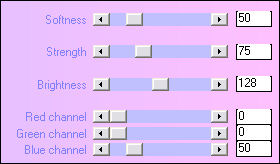
Selections - Select None.
Selections - modify - Contract by 10.
Selections - Invert.
Add a new raster layer.
Fill with the background color.
Effects - Edge Effects - Enhance More:
2x.
Effects - Filter Effects - Unlimited
2.0 -
Paper Texture - Japanese Paper: 40 -
87.
Selections - Select None.
Open the tube ' mc3167' .
Copy and paste as a new layer onto the
canvas.
Adjust - Hue and Saturation -
Colorize: 160 / 25.
Move it to the top left.
Layer opacity: 90%.
Merge all layers.
Image - Add Borders:
1 pixel - white.
30 pixels - color #444f5b.
Select with the Magic Wand.

Effects - Texture Effects - Weave:
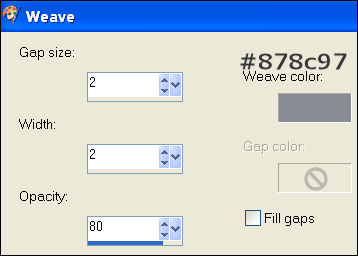
Image - Rotate - Free Rotate: 90 /
Right.
Repeat the Weave effect.
Image - Rotate - Free Rotate: 90 /
Left.
Effects - Filter Effects - Unlimited
2.0.
Buttons & Frames - Glass Frame 2: 64
/ 80.
Deselect.
Add a new raster layer.
Change the foreground color to
#a6aab2.
Activate the Brush tool.
Find the brush 'agi 11-U2-willfollow'
( size 275 )
Apply to the bottom left.
Effects - 3D Effects - Drop Shadow:
1 / 1 / 80 / 2 / color black.
Add our name on a new raster layer.
Layers - Merge - Merge All.
Save as optimized jpg.
Have fun ! :)
©Adriana Designs.
This tutorials has
been registered at

Adriana:
Email

Magstags Home | Filter Links |
Email |
Terms of Use |