|
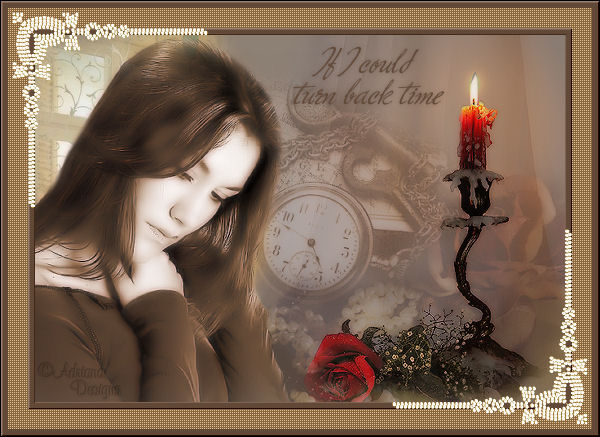
~*~ If I can Turn
Back Time ~*~
Adriana's original
Dutch tutorial can be viewed
here
TERMS
OF USE
This tutorial was written on 13-3-2007
for Psp 9.
Download the
supplies
here.
If you want to share the tubes,
kindly keep the filenames intact.
Please respect their work.
FILTERS
NEEDED:
Xero
Penta.com
BorderMania
Download
here |
METHOD
The Color Palette:
Foreground color: #8e8175
Background color: #624837

Open a new transparent canvas: 650
x450 pixels.
Fill the canvas with the foreground
color.
Open the tube ' SS_1708'.
Copy and paste as a new layer onto the
canvas.
Image - Resize: 80%.
Change the Blend Mode of the layer to
'Soft Light'
in the Layers palette.
Move it to the bottom right
as seen in the example.
Open the tube ' Kara T1477'.
Copy and paste as a new layer onto the
canvas.
Move it to the top left.
Open the tube' SS_1676' .
Copy and paste as a new layer onto the
canvas.
Move it to the right and a little bit
to the top.
Change the layer opacity to 90%.
Open the tube 'grandpa_treasure'.
Copy and paste as a new layer onto the
canvas.
Image - Resize 90%.
Layer opacity: 70%.
Move it into position.
Open the tube 'mc2546'.
Copy and paste as a new layer onto the
canvas.
Image - Mirror.
Image - Resize: 80%.
Move it to the left.
Layer - Duplicate.
Layers - Merge - Merge Down.
Adjust - Photo Fix - Digital Camera
Noise Removal.
Layers - merge - Merge All.
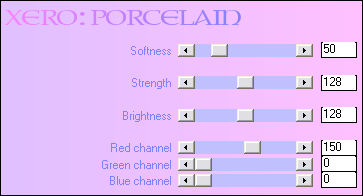
Effects - Filter Effects - Xero:
Porcelain:
* 1 *
Image - Add Borders:
10 pixels - color #624837.
Select the border with the Magic Wand.

Effects - Filter Effects -
Bordermania, Frame 2:
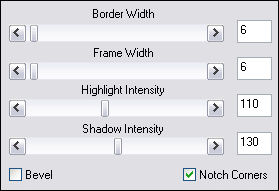
Selections - Select None.
* * *
Image - Add Borders:
25 pixels - color #88663e.
Select the border with the Magic Wand.
Effects - Filter Effects - Penta.com:
color dot.
Selections - Select None.
Repeat * 1 *
Open the Pearls - tube.
Copy and paste as a new layer onto the
canvas.
Image - Resize: 80% ('Resize All
Layers' = not checked)
Adjust - Hue and Saturation -
Colorize: 30 / 120.
Adjust - Sharpness - Unsharp Mask.
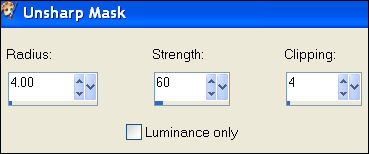
Move it to the top left.
Duplicate this layer in the Layers
palette.
Image 0 Mirror.
Image - Flip.
Layers - Merge - Merge Down.
Activate the Text tool - floating.
Lock the foreground color.
Choose a font, such as ' Ministry
Script, size 28.
Type ' If I could turn back time'.
Promote the selection to a layer in
the Layers palette.
Selections - Select None.
Duplicate this layer in the Layers
palette.
Layers - Merge - Merge Down.
Effects - 3D Effects - Drop Shadow:
0 / 0 / 22 / 7 / color black.
Move it into position.
Add your name on a new raster layer.
Layers - merge - Merge All.
Save as optimized jpg.
Have fun! :)
©Adriana Designs.
This tutorials has
been registered at

Adriana:
Email

Magstags Home | Filter Links |
Email |
Terms of Use
|