|
~*~ City Girl ~*~
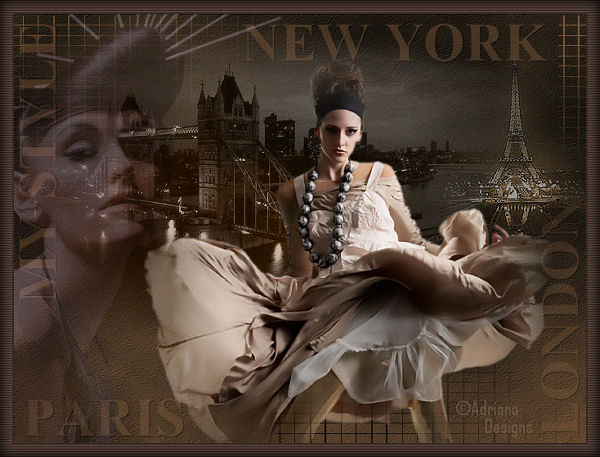
Adriana's original
Dutch tutorial can be viewed
here
Download the
supplies
here.
TERMS OF USE
FILTERS
NEEDED:
Photo Effex - download
here
The tubes were made by
Marcio,
Suzi en Hans,
and the background by
Azyzam.
Click on the name to go the their
sites.
If you want to share their tubes,
please keep the filenames intact
and respect their work.
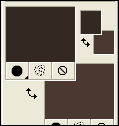
The Color Palette:
Foreground color: #342922
Background color: #4b3931
Open the 'azyzambg9oj0'.
That will be your workspace.
Open the tube 'mc818'.
Copy and paste as a new layer onto the
canvas.
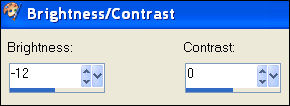
Adjust - Brightness and Contrast:
Move it a little bit to the top and
left
as seen in the example.
Change the layer opacity to
'Luminance (Legacy)'
in the Layers palette.
Change the Blend Mode of the layer to
70%
in the Layers palette.
Open the tube 'hjr_misted_eiffel2'.
Copy and paste as a new layer onto the
canvas.
Move it to the top right.
Blend Mode 'Luminance'.
Layer opacity 64%.
Open the tube 'SS_1878.'
Copy and paste as a new layer onto the
canvas.
Layer opacity 24.
Open the tube 'mc2401'.
Copy and paste as a new layer.
Duplicate this layer in the Layers
palette.
Layers - Merge - Merge Down.
Move it a little to the bottom and
right.
Layers - Merge - Merge Visible.
Image - Add Borders: 2 pixels white.
Select the border with the Magic Wand.

Fill with the foreground color.
Selections - Select None.
Image - Add borders: 15 pixels -
white.
Fill with the background color.
Effects - Filter Effects - Photo
Effex: Scanlines - standard.
Selections - Select All.
Effects - 3D Effects - Cut out:
3 / 3 / 60 / 20 / color - back.
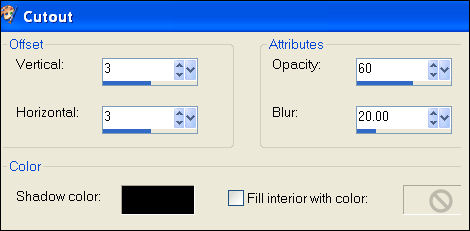
Repeat with V & H on -3.
Selections - Select None.
Layers - Merge - Merge All.
Save as optimized jpg.
©Adriana Designs.
This tutorials has
been registered at

Adriana:
Email

Magstags Home |
Filter Links |
Email |
Terms of Use
|