|

~*~ The Story From ... ~*~
My Lifetime ...

Kyra's original Dutch tutorial can be viewed
here
Download the supplies
here
This tutorial was specially written for
Maria of the
Bellisimo group
FILTERS NEEDED
None.
The Color Palette:
Foreground color: #F1EFE8
Background color: #927762
Start with a new transparent canvas: 850 x550 pixels.
1: Fill the canvas with the dark color.
Add a new raster layer and select all.
2: Open the '1614' background image.
Copy and paste it into the selection.
Change the layer opacity to 'Luminance(Legacy)'
in the Layers palette.
Deselect.
3: Open the 'marif-2007-05 Mai'- tube.
Copy and paste as a new layer onto the canvas.
Change the layer opacity to 'Luminance(Legacy)'
in the Layers palette.
Change the Blend Mode of the layer to 70%
in the Layers palette.
4: Open the 'bloem 4'-pspimage.
Copy and paste as a new layer onto the canvas.
5: Image - Rotate - Free Rotate: 90 / Right.
Image - Mirror.
Change the layer opacity to 'Luminance(Legacy)'
in the Layers palette.
Move it to the right.
6: Open the 'Marif-2007-Juillet'- image.
Copy and paste as a new layer onto the canvas.
Image - Resize: 110%.
Move it to the left.
7: Open the 'Kyra brush' or use your own text.
Copy and paste as a new layer onto the canvas.
You can also import it as a brush before you use it of course.
Apply a drop shadow:
-2 / -2 / 50 / 7 / color black.
8: IMage - Add Borders:
2 pixels - light color.
2 pixels - dark color.
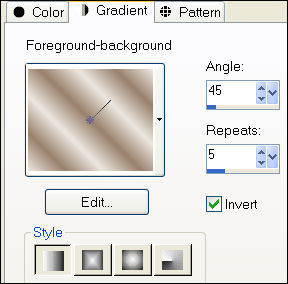
9: Make a gradient:
Style - Linear
Angle - 45
Repeats - 5
Invert - checked:
10: Add a 20 pixel white border.
Select with the Magic Wand
and fill with the gradient.
11: Image - Add Borders:
2 pixels - light color
1 pixel - dark color.
Add your name or watermark and you're done !! :)) .
Copyright©
registered at

~***~
Kyra's
Guestbook
Email Kyra
Email Maggie
~***~
Back to Index

Translated 19 Augustus 2007

| Home
|
Filter Links |
Email |
|