|

~*~ Dior Woman ~*~
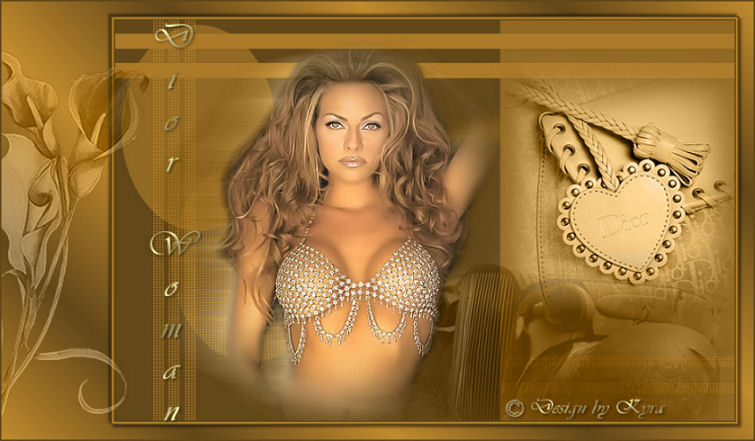
Kyra's original Dutch tutorial can be viewed
here
Download the supplies
here
FILTERS NEEDED
None.
The Color Palette:
Foreground color: #C28C2E
Background color: #63481A
Start out with a new transparent canvas: 850 x550
pixels.
1: Fill the canvas with the dark color.
Add a new raster layer.
Fill with the light color.
2: Layers - Load/Save Mask - Load Mask From Disk:
Find the 'Heland 08' and apply.
Layers - merge - merge group.
3: Open the 'Marif-2007-Voiture'- image.
Copy and paste as a new layer onto the canvas.
Image - Mirror.
Change the layer opacity to 'Luminance(Legacy)'
in the Layers palette.
Change the Blend Mode of the layer to 45%
in the Layers palette.
Move it to the bottom right.
4: Open the 'Marif-2007-Dior'- image.
Copy and paste as a new layer onto the canvas.
Image - Mirror.
Arrange it above the wagon.
5: Open the 'PPT-Glamour'- image.
Copy and paste as a new layer onto the canvas.
Duplicate this layer.
Activate the bottom image.
6: Effects - Distortion Effects - Wind: Right / 100.
Change the layer opacity to 'Luminance(Legacy)'
in the Layers palette.
7: Activate the duplicated layer now.
Effects - 3D Effects - Drop Shadow:
2 / 2/ 50 / 5 / black.
8: Image - Add Borders:
2 pixels dark color
2 pixels - light color
2 pixels - dark color.
9: Image - Add Borders:

10: Change the background (dark color) to a gradient:
Style - Linear
Angle - 45
Repeats - 3
Invert - checked:
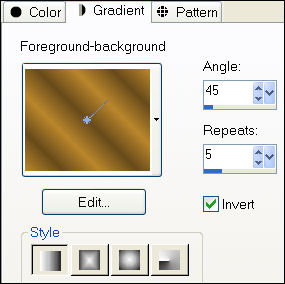
11: Select the white border with the Magic Wand
and fill with the gradient.
Selections - Invert.
Effects - 3D Effects - Drop Shadow:
3 / 3/ 50 / 5 / black.
Repeat with V & H -3.
12: Open the 'Flower 1'- image.
Copy and paste as a new layer onto the canvas.
Image - Resize: 4x to 110%.
Change the layer opacity to 'Luminance(Legacy)'
in the Layers palette.
Change the Blend Mode of the layer to 45%
in the Layers palette.
13: Change your color to a gold pattern.
Activate the Text tool.
Choose a font, such as Vivaldi, size 48,
font direction:

and add your text.
Apply a drop shadow:
2 / 2/ 50 / 5 / black.
Arrange the text where you like it.
14: Image - Add Borders:
2 pixels - dark color.
Add your name or watermark to finish up :)
Copyright©
registered at

~***~
Kyra's
Guestbook
Email Kyra
Email Maggie
~***~
Back to Index

Translated 19 Augustus 2007

| Home
|
Filter Links |
Email |
|