|

~*~ Pure And Innocent ~*~
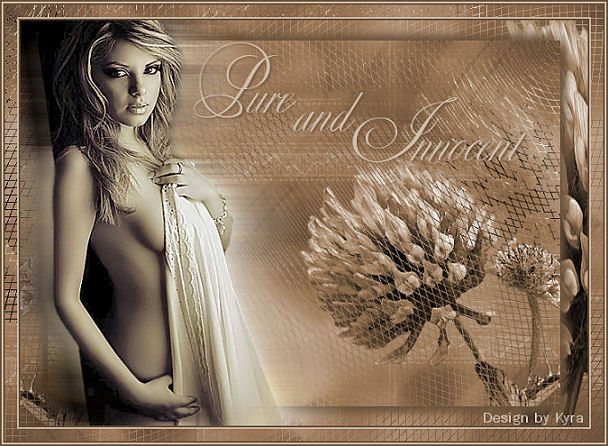
Kyra's original Dutch tutorial can be viewed
here
Download the supplies
here
FILTERS NEEDED
Filter Tramages-Wire Mesh
Light color : #A78668
Dark color : #6C543D
New transparent canvas: 700 x 500 pixels.
1: Fill the canvas with the dark color.
Selections - Select All.
Copy the 'BGslaapwel'- tube
and paste as new layer.
Position it in the top left corner.
Adjust - Hue and Saturation - Colorize:
Hue 21 / Saturation 71.
Merge all layers.
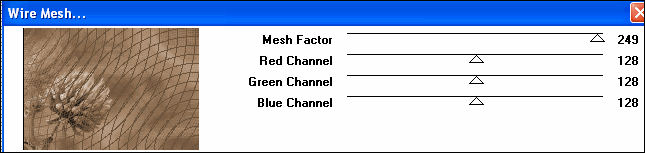
3: Effects - Filter Effects - Tramages - Wire Mesh
with these settings:
4: Copy your work
and paste as new layer.
Image - Mirror.
Image - Resize: 90%.
5: Apply a drop shadow: 7 / 7 / 100 / 15 / color black.
Repeat with V & H -7.
6: Copy and paste the tube 'MC2915'- tube
as a new layer.
Image - Mirror.
Duplicate the tube layer 2x in the Layers palette.
7: Activate raster 2.
Effects - Distortion Effects - Wind: 100 / Right.
Do the same with raster 2 but wind direction should be left.
8: Lock all layers except for the merged layer.
9: Copy and paste the 'Yoka Flower'- tube again as new layer.
Image - Mirror.
Move it to the right.
10: Use the Deformation tool
to drag it out over the entire length of the canvas.
Colorize it.
Merge layers.
11: Add a new layer.
Activate the Text tool and type 'Pure and Innocent'
Apply a drop shadow:
2 / 2 / 70 / 4 / color black.
12: Add borders:
2 pixels - dark color;
2 pixels - light color;
15 pixels - dark color.
Select with the Magic wand.
Copy the 'BGslaapwel'- tube
and paste it into the selection.
13: Effects - Filter Effects - Tramage - Wire Mesh
with the same settings as before.
14: Add borders:
2 pixels - dark
2 pixels - light
2 pixels - dark.
Add your name or watermark to finish off.
Have fun ! :-)
~***~
Kyra's
Guestbook
Email Kyra
Email Maggie
~***~
Back to Index
©Copyright
registered at

Translated 14th July 2007

| Home
|
Filter Links |
Email |
|