|

~*~ Caress ~*~
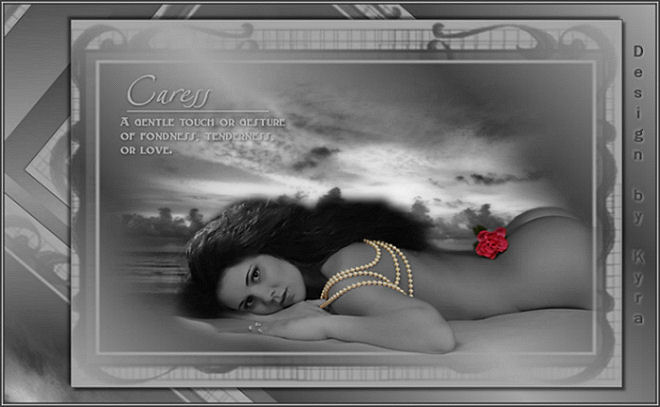
Kyra's original Dutch tutorial can be viewed
here
Download the supplies
here
FILTERS NEEDED
None
Light color : #A7A7A7
Dark color : #464646
New transparent canvas: 750 x 500 pixels.
Make a gradient with these settings:
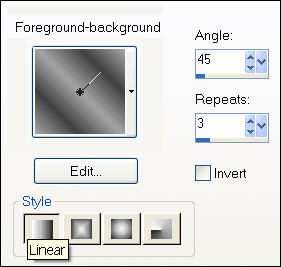
1: Fill the canvas with the gradient.
Add a new layer and fill with the light color.
2: Layers - Load/Save Mask - Load Mask from Disk:
find the 'Gabee-mask1144' and apply.
Merge group.
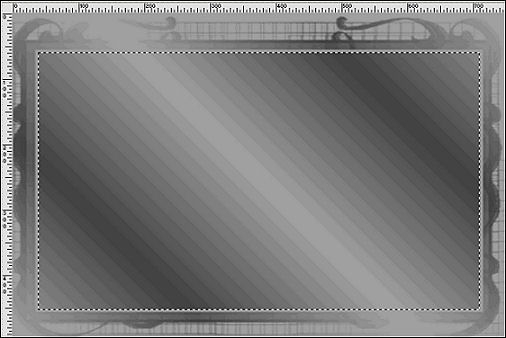
3: Activate the Selection tool and draw
a rectangular selection on the mask layer
as seen below:
4: Add a new layer.
Open the 'mds 4831'.
Copy and paste into the selection.
Blend mode: Luminance(Legacy).
Deselect.
5: Open the tube 'AC Rose'.
Copy and paste as a new layer.
Move it to the bottom.
Merge all layers.
7: Add a border: 'Symmetric' = NOT CHECKED:
Top and Bottom - 20
Left - 90
Right - 50
8: Select with the Magic Wand and fill with the same gradient
as before.
9: Effects - Reflection Effects - Rotating Mirror:
Horizontal and Vertical offset: 5
Rotation Angle: 20
Edge mode: wrap.
10: Selections - Invert.
Effects - 3D Effects - Drop shadow:
4 / 4 / 50 / 5 / color black.
Repeat with V & H -4 .
11: Open the 'becky-WD-Caress'-brush.
Add a new layer.
Apply the brush in the light color.
12: Effects - 3D Effects - Drop shadow:
1 / 1 / 40 / 5 / color black.
13: Add borders:
2 pixels - dark color;
2 pixels - light color;
2 pixels - dark color.
Add your name or watermark and you are done! :)
~***~
Kyra's
Guestbook
Email Kyra
Email Maggie
~***~
Back to Index
©Copyright
registered at


Translated 14th July 2007

| Home
|
Filter Links |
Email |
|