|
No's
Star Child
Noëlla's Dutch tutorial
** Note from Maggie: **
I changed the size of my
image for this tutorial
to actually fit into this
table.
Noëlla' s tut is written
for a stationery,
therefore will be a bit
wider.
**********
Materials needed:
An image of your choice, or download
here.
Masker 20/20
Filters:
Toadies
F.M.Tile
Tools
Download
here
*****
Open your image,
copy (Shift+D)
and close the original.
Edit -- Copy.
Minimize for now.
Open a new transparent canvas, size
1024 op 360.
Go to Selections -- Select All.
Paste into the selection.
Deselect.
Leave it for now.
Activate your image again.
Image -- Resize to 300 pixels in height.
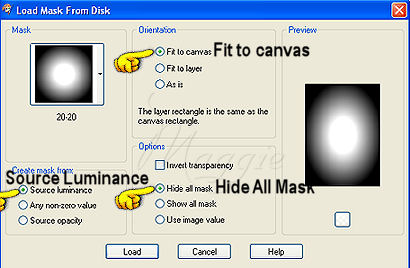
Go to Layers -- Load/Save Mask -- Load Mask from Disk
find the mask 20-20,
with these settings:
Go to your Layers palette and
delete the mask layer.
Reply ' yes' to the question.
Activate the bigger background canvas again.
Go to Adjust -- Blur -- Gaussian Blur -- 10.
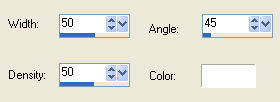
Go to Effects -- Artistic Effects -- Topography,
with these settings:
Go to Effetcs --User Defined Filter,
with these settings:

Go to Effects -- Filter Effects --
Toadies -- Sucking Toad -- Bevel III,
with these settings:
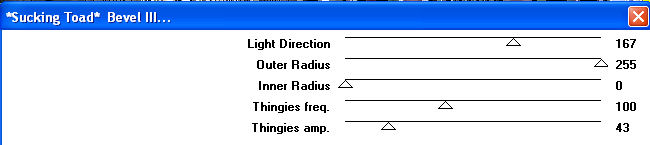
Go to Effects -- Filter Effects --
FM Tile Tools -- Seamless Tiling,
with these settings:
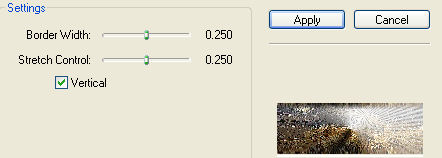
Remember to check the " vertical"
setting !!!
Activate your masked image again.
Copy and paste as new layer onto the canvas.
Shift it to the left and position it where you like it.
Go to Layers -- New Raster Layer.
Add your watermark or name.
Go to Layers -- Merge -- Merge Visible.
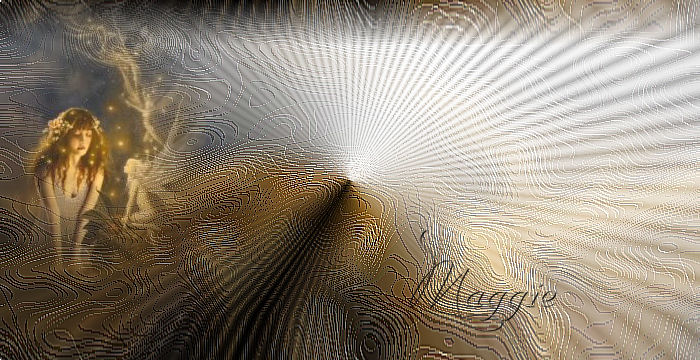
Your stationery is finished !! :)
Enjoy !

Translated 2nd September
2005

©Magstags2005
|