|

Love
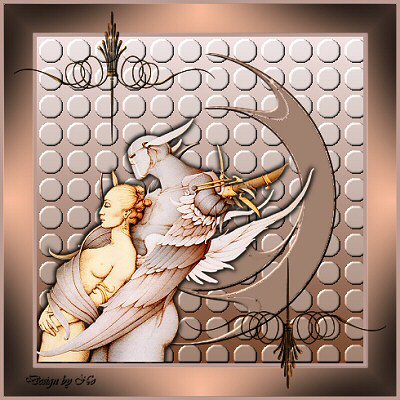
A Translated tutorial of No
***
Materials
needed:
A tube of your choice, or use the beautiful
tube by Manon.
Selection and Mask
A decorative tube.
download
here
Filter: Greg’s Factory Output Volume
II.
Simple, Pizza Slice Mirror.
***
Open
a new canvas 400x400.
Copy your tube (Shift+D) and close the original.
Choose a light color for your foreground,
and dark color as background from your tube.
Change your background color to gradient,
with these settings:
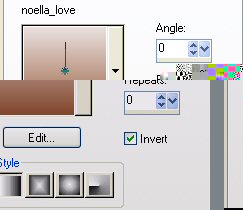
Fill the canvas with the gradient.
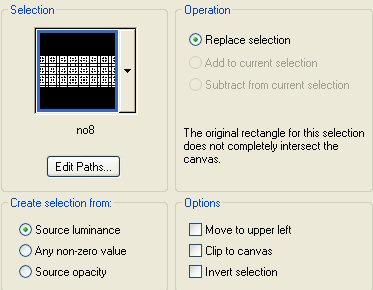
Go to Selections-->Load/Save Selection-->
Load Selection from Disk.
Apply Selection no8,
with these settings:
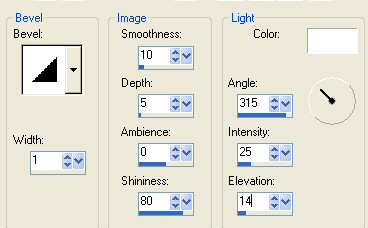
Go to Effects-->3D Effects-->Inner Bevel,
with these settings:
Add a new raster layer.
Fill with the dark color.
Go to Layers-->Load/Save Mask-->
Load Mask from Disk.
Find the Nomaskswirl and
apply with these settings:
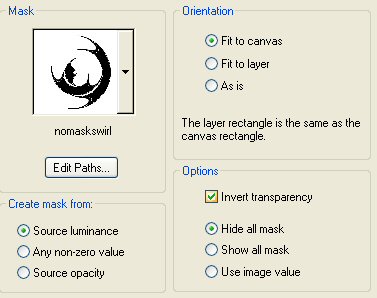
Right-click on the Mask layer in your
Layers Palette
and delete the mask. Reply "yes" to
the question.
Go to Layers--> Merge--> Merge Group
Repeat the same Inner Bevel effect on the
raster 2 layer.
Reduce the size of your tube to 300
pixels in height.
Copy and Paste as New Layer onto the
canvas.
Position it where you want it.
Go to Effets-->3D Effects --> Drop
Shadow,
with these settings:
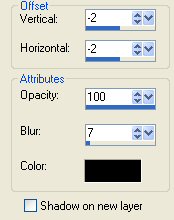
Repeat the drop shadow with the
Horizontal and Vertical
settings on 2.
Go to Layers--> Merge--> Merge All.
Go to Image--> Add Borders-->
Add a 5 pixel border with a less light
color than in the image.
Add a 35 pixel border with the dark
background color.
Add a 5 pixel border in the same light
color as before(first color).
Select the dark border with your Magic
Wand.
Go to Effects--> Filter Effects-->
Greg's Factory Output, Vol2--> Pool
Shadow
and apply with the standard settings.
Go to Effects, Filter Effects-->
Simple-->
Pizza Slice Mirror and apply.
Go to Layers--> New Raster Layer.
Find your decorative tube and add as a
new layer.
Go to your Layers Palette and duplicate
this layer.
Go to Image--> Mirror
Go to Image-->Flip.
Go to Layers--> New Raster Layer
and apply your text or watermark.
Go to Layers--> Merge--> Merge All.
Reduce the size of your image to 400 pixels high.
Ziezo, you're done!
Enjoy!
©No2005


©Magstags2005
|