|
Christmas Children
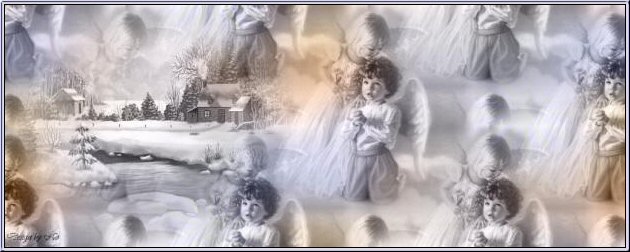
A tutorial of Noëlla's
***
Materials needed:
A Christmas image of your choice.
Background: download here.
Filter VM Natural,
stardust: download here.
Masker 20/20.
***
Open
a new canvas 1024x400.
Go to Selections--> Select All.
Open your image and copy (Shift+D)
Close the original.
Edit-->Copy.
Open the canvas and Paste into the selection.
Deselect (Ctrl+D)
Go to Adjust-->Blur-->Gaussian Blur: radius 30
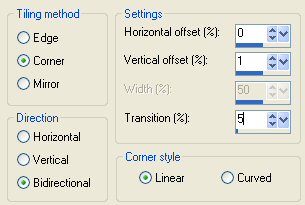
Go to Effects--> Image Effects-->Seamless Tiling,
with these settings:
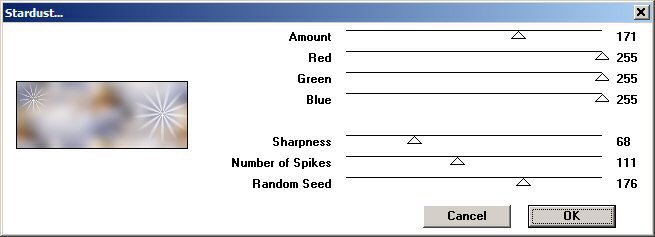
Go to Effects-->Filter Effects--> VM Natural-->
Stardust, with these settings:
Go to Effects-->Texture Effects-->Straw Wall,
with these settings:
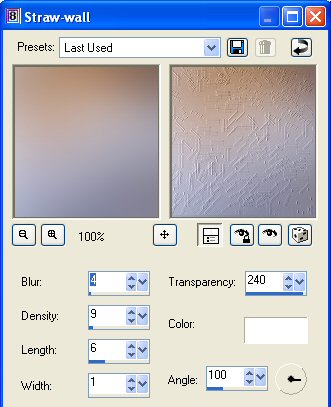
Go to Effects-->Image Effects-->Seamless Tiling,
apply with the same settings as before.
Leave this canvas like this for now.
Change your foreground color to Pattern and find your tube,
with these settings:
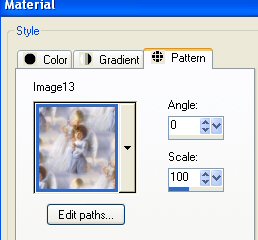
On the Canvas: Go to Layers-->New Raster Layer.
Fill this layer with the pattern.
Change the Blende Mode of this layer to Luminance(Legacy)
in the Layers Palette.
Activate your own Christmas Image and reduce the
size to 350 high.
Go to Layers-->Load/Save Mask-->Load Mask from Disk,
and find the mask20/20 and apply.
Right-click on the mask layer in the Layers Palette and
delete.
Reply "yes" to the question.
Right-click on the group layer in the Layers Palette and
Merge Group.
Copy the image and Paste as New Layer onto your canvas.
Add a new raster layer and apply your watermark or text.
Layers-->Merge-->Merge All.
And you're done.
Enjoy!
©No2005


©Magstags2005
|