|

CHILD
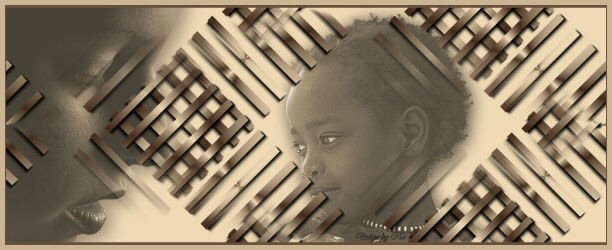
A tutorial of Noëlla
***
Materials needed:
Selection: download
here
A Tube of your choice
Filter:
Simple: Diamonds
***
Open a new canvas of 1024/400
Fill with a color that compliments your image
Go to Layers-->New Raster Layer.
Step 1: Go to Selections--> Load/Save Selection-->
Load Selection from Disk-->Sel no 4
Set your foreground to a dark color
and the background to a light color from your tube.
I used the same color which I filled the first layer with.
Change the foreground color to a gradient,
with these settings:
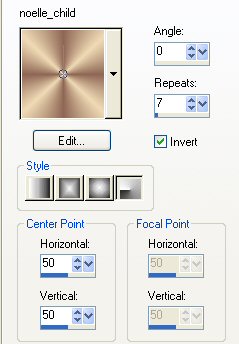
Fill the selection with the gradient.
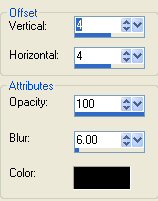
Go to Effects-->3D Effects-->Drop Shadow,
with these settings:
Deselect
Step 2: Go to Effects-->Filter Effects-->
Simple-->Diamonds and apply.
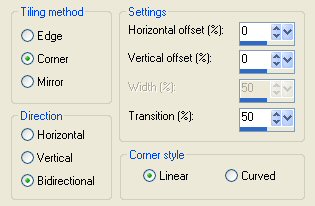
Go to Effects--> Image Effects-->
Seamles Tiling, with these settings:
Repeat Step 1 and Mirror the image.
Repeat Step 2.
Repeat the Mirror effect again.
Step 3: Go to Layers-->New Raster Layer
Copy and Paste the first tube onto the
canvas
and position it.
Repeat Step 3 but with the other tube.
Apply a drop shadow to both tubes on the
canvas.
Go to your Layers Palette and change the
Blend Mode
of both these tube layers to 70%
Go to Layers-->Merge--> Merge All.
Go to Image--> Add Borders BUT
uncheck the "symmetrical" option.
Add a top and bottom border of pixels.
( Left and Right should be zero)
Add a new Raster Layer and add your name
of watermark.
Merge All.
You're done! :-)
Enjoy!
©No2005


©Magstags2005
|