~*~ Tulips ~*~
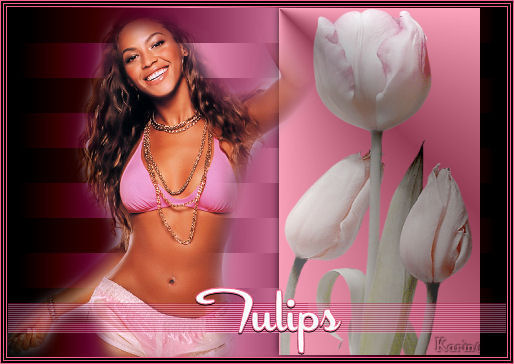
Karins's original Dutch
tutorial can be viewed here
MATERIALS NEEDED:
Download the supplies here.
FILTERS NEEDED:
L&K :
Trouble
Filter factory U
VM Extravaganza.
1. Open a new transparent canvas, size 500 x 350
pixels.
Fill the canvas with black.
Effects - Filter Effects - L&K: Trouble
with the slidebars on:
162 / 0 / 170 / 17 / 110 / 70.
Layers - new raster layer.
Activate the Selection tool
and draw a rectangular selection on the right
side: 200-350.
Fill the selection with black.
Effects - Filter Effects - Filter factory U:
forbidden island
with dial on 255 / Divisions on 130.
Layers - new raster layer.
Fill the layer with #f7638c.
Change the layer opacity to 60
in the Layers palette.
Open the tube 'winter tulips'.
Copy and paste into the selection.
Deselect (Ctrl+D)
Effects - 3D Effects - Drop shadow:
-1 / -1 / 100 / 10 / black.
Lock the bottom layer.
Activate one of the other layers.
Layers - Merge - Merge visible.
Unlock the bottom layer.
Activate the top layer in the Layers palette
again.
Open the tube 'ss1165'.
Copy and paste as a new layer onto the canvas.
Image - Resize: 65%.
Move it to the left.
Effects - 3D Effects - Drop shadow:
1 / 1 / 60 / 4 / zwart.
Move the tulips a little to the left
as seen in the example.
Minimize this canvas for now.
Open a new transparent canvas, size 500 x 30
pixels.
Fill the layer with #f7638c.
Effects - Filter Effects - VM Extravaganza:
Transmission:
line width: 12 / offset 8 / contrast 80.
Copy and paste as a new layer onto the first
canvas.
Move it to the bottom.
Change the layer opacity to 40%
in the Layers palette.
Layers - Merge - Merge All.
Add Borders:
1 pixel - f7638c
2 pixels - black
1 pixel - f7638c
2 pixels - black
1 pixel - f7638c
Change the background color to white in the
Color palette.
Change the foreground color to #f7638c.
Add your text.
Apply a drop shadow:
1 / 0 / 100 / 0 / black.
Add your name or watermark
and you're done :)
Back to Index

Magstags |
Filter Links |
Email |