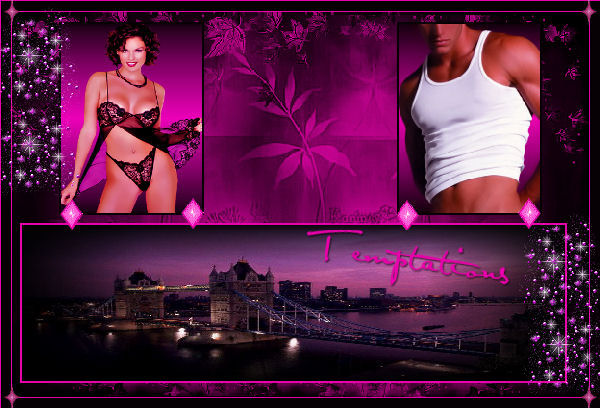
~*~ Temptations ~*~
Karins's original Dutch
tutorial can be viewed here
MATERIALS NEEDED:
Download the supplies here.
The tubes were made by
Danetta, Mario, MH and Jmca.
FILTERS NEEDED:
Filter: Adjust - Variations
1. Open a new transparent canvas, size 600 x 400
pixels.
Fill the canvas with black.
Layers - new raster layer.
Change the foreground color to #e802aa.
Activate the Brush tool - find the brush
'skf flower 5' and apply 1x to the left side of
the canvas.
Layers - Duplicate.
Image - Mirror.
Layers - Duplicate and shift this layer to the
center.
Layers - new raster layer.
Load the selection 'Karinpink1'.
Fill the selection with black.
Open the tube 'mc818'.
Copy and paste into the selection.
Selections - Modify - Select Selection Border:
Inside / width 2 / Antia-alias unchecked.
Fill the border with the pink color.
Deselect (Ctrl+D).
Layers - new raster layer.
Load the selection 'Karinpink4'.
Change the foreground color to gradient:
Style - Linear
Angle - 0
Repeats - 1
Invert - checked.
Fill the selection with the gradient.
Open the tube 'Torso'.
Copy and paste into the selection.
Effects - Filter Effects - Adjust - Variations:
Midtones/ More magenta.
Selections - Modify - Select Selections Border:
Inside / 2 / anti-alias - unchecked.
Fill the selection with black.
Deselect.
Layers - new raster layer.
Load the selection 'pinkkarin5'.
Fill the selection with the gradient.
Open the tube 'jmca' (woman).
Copy and paste into the selection.
Effects - Filter Effects - Adjust - Variations:
More magenta / Midtones checked.
Selections - Modify - Select Selection Border:
Inside / 2 / anit-alias - unchecked.
Fill the selection with black.
Deselect.
Open the accent tube.
Copy and paste as a new layer onto the canvas.
Paste it 4x on the canvas, see example.
Merge all layers.
Add borders:
1 pixel - pink
10 pixels - black
1 pixel - pink.
Open the 'accent2' tube.
Copy and paste as a new layer onto the canvas.
Move it to the top left corner.
Layers - Duplicate.
Image - Mirror.
Image - Flip.
Layers - Duplicate.
Image - Mirror.
Open the tube 'Dots-darkelf'.
Copy and paste as a new layer onto the canvas.
Paste it several times.
Merge all layers.
Add your watermark.
Add some text or your name.
Apply a drop shadow:
1 / 1 / 70 / 2 / black.
Resize the image if you want to.
You are done :)
Back to Index
Magstags |
Filter Links |
Email |