~*~ Summertime ~*~
Karins's original Dutch
tutorial can be viewed here
MATERIALS NEEDED:
Download the supplies here.
The tubes were made by Roxanne and
JoluusDogs.
FILTERS NEEDED:
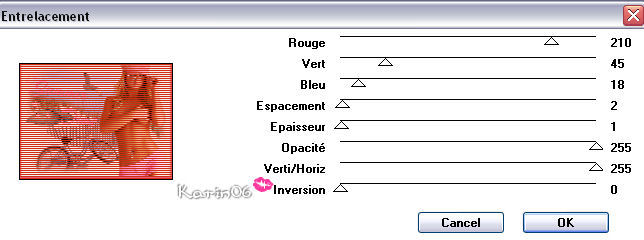
Filter: Jeux de lignes - Entrelacement.
1. Open a new transparent canvas, size 600 x 450
pixels.
Selections - Select All.
Open the misted beach tube.
Copy and paste into the selection.
Deselect (Ctrl+D)
Layers - new raster layer.
Fill the canvas with the color #f6f3ee.
Drag this layer below the bottom layer in the
Layers palette.
Activate the top layer in the Layers palette.
Open the lady tube.
Copy and paste as a new layer onto the canvas.
Image - Resize: 102.
Move it to the right.
Effects - 3D Effects - Drop shadow:
1 / 1 / 25 / 1 / black.
Open the bird tube.
Image - Mirror.
Copy and paste as a new layer onto the canvas.
Move it to the top
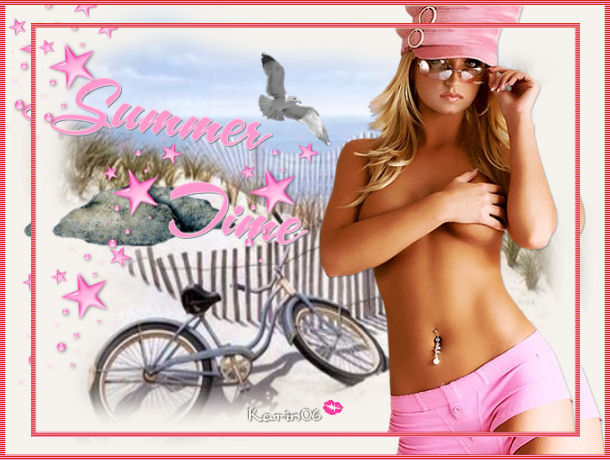
as seen in the example.
Open the 'beachrocktube'.
Image - Resize: 80%.
Copy and paste as a new layer onto the canvas.
Move it into the dunes.
Open the tube 'Summertime text'.
Copy and paste as a new layer onto the canvas.
Effects - 3D Effects - Drop shadow:
1 / 1 / 25 / 1 / color = #77808c.
Open the accent tube.
Copy and paste as a new layer onto the canvas
and arrange it where you like it.
Layers - Merge - Merge All.
Add a 5 pixel border in color #fd98ce.
Select the border with the Magic Wand.
Effects - Filter Effects - Jeu de Lignes:
Entrelacement.
Layers - Duplicate.
Image - resize: 90 - 'Resize All Layers' = not
checked.
Layers - Merge - Merge All.
Resize your image if you want to.
Add your watermark
or name and you're done! :)
Back to Index

Magstags |
Filter Links |
Email |