~*~ Steven Seagal ~*~
Karins's original Dutch
tutorial can be viewed
here
Materials Needed:
Download the supplies here.
FILTERS NEEDED:
Filter Factory Gallery F
DSB Flux
Open a new transparent canvas, size 500x500
pixels.
Change the foreground color to #f8c9b4,
background on #883e36.
Make a gradient:
Angle 0
Repeats 1
Invert - checked
Style - Linear.
Fill the canvas with the gradient.
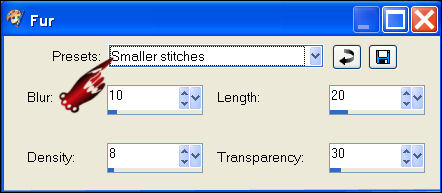
Effects - Texture Effects - Fur :
Preset = Smaller Stitches.
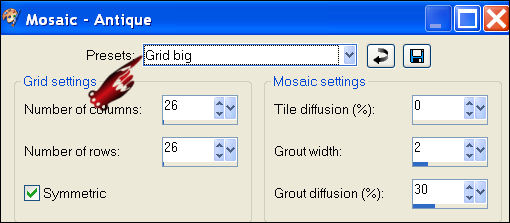
Effects - Texture Effects - Mosaic Antique:
preset = grid big
Effects - Filter Effects - Filter Factory F
- Borderfilm:
Division 16; background; red, green and blue
on 0;
Internal X 15,
Internal Y 3.
Use the Magic Wand to select the top blocks.
Fill with the light color.
Effects - DSB Flux - Spiderweb:
rays 7
rings 1
merge 50.
Deselect.
Use the Magic Wand again to select the
bottom blocks.
Repeat the same spiderweb effects.
Deselect.
Add a new raster layer.
Enable your ruler.
Activate the Selection Tool: rectangle.
Draw a rectangle: begin just below the top
film square ( at 10)
and end just above the bottom film square -
draw the rectangle now to the right to 310.
Fill with the gradient.
Effects - Filter Efects - DSB Flux -
Spiderweb,
with the same settings as before.
Apply a drop shadow:1, 1, 100, 1, black,
Repeat the drop shadow but with V & H on -1.
Deselect.
Draw another rectangle now in the existing
rectangle.
The second rectangle should be smaller than
the first one.
Open your biggest image and resize to 300
pixels in height
and 213 in width.
Edit - Copy.
Edit Paste into selection on the canvas.
Apply the same drop shadow as before.
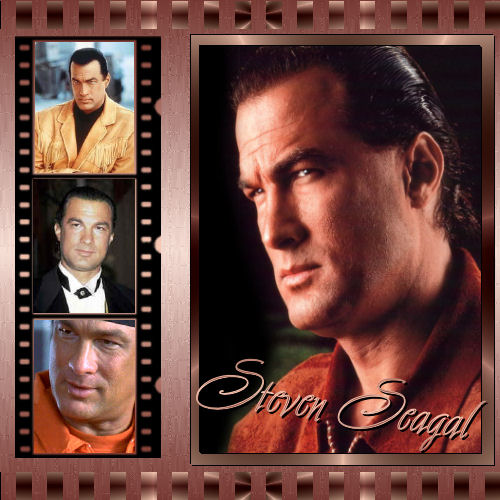
Move it to the right as seen in the example
tag.
Add a new raster layer.
Selections - Load/Save Selections from Disk:
find the 'Steven Seagal Karin'- selection
and apply.
Open your filmstrip.
Copy and paste into selection.
Deselect.
Open the other 3 images that must be added
to the filmstrip.
Use the Selection Tool to draw a rectangled
selection
in the top filmstrip.
Copy and paste the first image into the
selection.
Deselect.
Draw the second selection.
Paste the second image into the selection.
Deselect.
Do the same with the third image.
Deselect.
Add a new raster layer.
Add your text.
You can use 'Avalon'- font, size 56.
Apply a drop shadow:2, 2, 100, 1, black.
Merge all layers.
Add your watermark
and that's it :)
You can resize it if you want to.
Back to Index

Magstags |
Filter Links |
Email |