~*~ Scrap Sharon ~*~
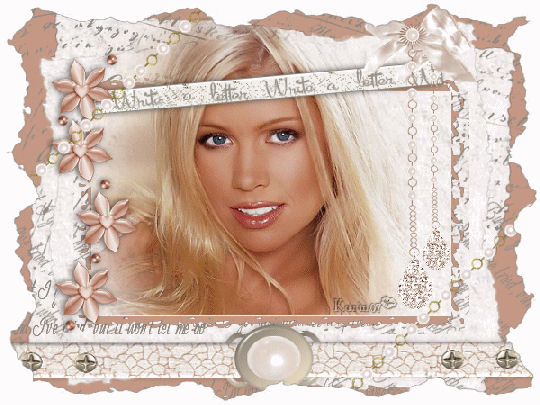
Karins's original Dutch
tutorial can be viewed
here
MATERIALS NEEDED:
Download the supplies
here.
The scrapset was provided by Suzanne
in her scrapbooking club
and gave permission to Karin for the set to
be used in this tutorial
Visit her club
here.
The tube was made by Suzi Sgai.
Import the brushes to your PSP-brushes
folder.
FILTERS NEEDED:
I.C.NET Software's Filters Unlimited.
Open a new transparent canvas, size 600 x
450 pixels.
Change the foreground color to #c69985
Fill the canvas with the color.
Add a new raster layer.
Find your patttern 'beige 169' and
apply with:
Angle 0, Schale 250.
Effects - Filter Effects - Filters Unlimited
- Edges Square -
Square Edge 12.
Duplicate this layer.
Lock the top layer in the Layers palette.
Activate the second layer.
Image - Resize 90% 'Resize All Layers'= not
checked.
Image - Rotate - Free Rotate - 5 degrees -
Right:
'Rotate single layer around center' =
checked.
Change the foreground color to #8f8b82.
Activate the Brush tool and find the 'oudschrift-
- brush.
Apply it a few times to the top edge of the
canvas in the foreground color.
Find the 'neil diamond'- brush.
Apply it a few times to the bottom edge
of the canvas.
Unlock the top layer again.
Image - Resize 85%.
Image - Rotate - Free Rotate: left - 5
degrees.
'Rotate single layer around center' =
checked.
Activate the ruler.
Activate the Selection Tool - Rectangle
and draw a selection in the top left corner
from zero to 100 - right
and zero to 100 - down.
Draw another selection to 500 top right
and 350 below.
Selections - Modify - Select Selection
Borders:
Border width 20
'Anti-alias'- not checked.
Fill the border with the color #c69985.
Effects - Filter Effects - Edges Square -
Square Edge 6.
Deselect.
Open the tube 'ss 428'.
Copy and paste onto the canvas.
Move her a bit to the left.
Image - Resize to 85% - 'Resize All Layers'
= not checked.
Select the bottom part of the lady that is
falling outside the bottom edge with the
Selection Tool.
Press your delete key 1x.
Deselect.
Activate the lasso tool - Free hand.
Select the top part of the lady that is
visible
on layer 1.
Remove the parts that is sticking out.
You can use the Eraser Tool to
erase it more precisely.
Open the tube 'write_a_letter_karin'.
Copy and paste onto the canvas.
Image - Rotate - Free Rotate - 5 degrees -
left.
Move it to the top left as seen in the
example.
Apply a drop shadow: 0, -2, 60, 10, black.
Open de tube 'strik_hanger_druppel'.
Copy and paste onto the canvas.
Adjust - Hue and Saturation - Colorize:15, 60.
Image - Resize to 85%.
Move it to the right.
Layers - Duplicate.
Image - Resize to 80%.
Move it against the big bow.
Layers - Arrange - Move Down.
Activate the top layer in the Layers
palette.
Open the tube 'Flower_karin'.
Copy and paste onto the canvas as a new
layer.
Move it to the left edge.
Repeat the same drop shadow.
Open the tube 'Driver_crackt_parel'.
Copy and paste.
Move it to the bottom.
Use the Deformation Tool to draw out the
sides
to fit against the edges of the canvas.
Apply the same drop shadow but change the
opacity setting of the shadow to 20.
Open the 'armbandparels'- tube.
Copy and paste.
Move it to the top left.
Duplicate this layer.
Image - Mirror.
Image - Flip.
Merge all layers visible.
Effects - Filter Effects - Filters Unlimited
- Edges Square - Square Edge 13.
Add your watermark to finish up :)
Have fun!
Back to Index


Magstags |
Filter Links |
Email |