~*~ Nancy ~*~
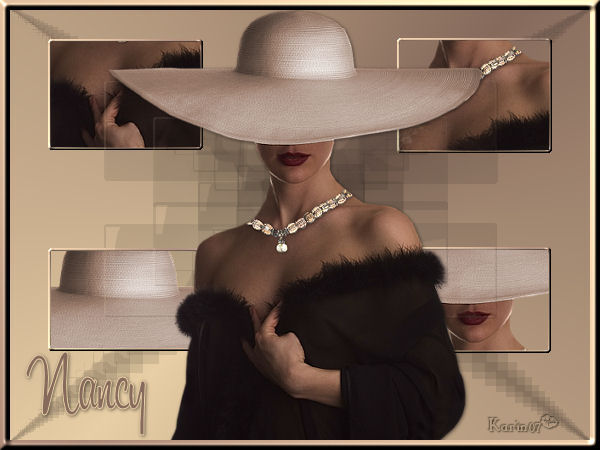
Karins's original Dutch
tutorial can be viewed here
MATERIALS NEEDED:
Download the supplies here.
Save the selection to your PSP-selection
folder.
Open the tube in PSP.
FILTERS NEEDED:
None
The Color Palette:
Foreground: dark color
Background: light color
Foreground color on gradient:
Style: Radial
Center points both on 50
Angle - 45
Repeats 1
Invert - unchecked.
1. Open a new transparent canvas, size 600 x 450
pixels.
Fill the canvas with the gradient.
Layers - new raster layer.
Selections - Load/Save Selection - Load Selection
from Disk:
Find the 'karinhead1'- selection and apply.
Open the lady tube.
Copy and paste as a new layer onto the canvas
Image - Resize: 85%.
Move a part of the lady into the selection.
Selections - Invert.
Press delete.
Selectoins - Invert.
Selections - Modify.
Selections - Select Selections Border:
outside / anti alias / width 2.
Fill the border with the gradient.
Effects - 3D Effects - Inner Bevel:
Round / 2 / 14 / 15 / 12 / 0 / 50 / 315 / 63 / 30
/ white.
Deselect (Ctrl+D).
Effects - Reflection Effects:
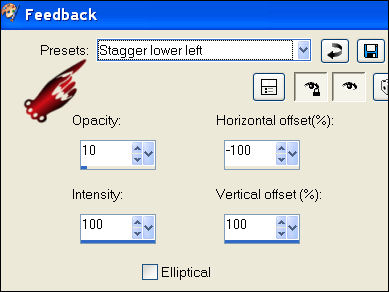
Layers - new raster layer.
Load Selection:'karinhead2'
Repeat the same steps as with the previous
selection but this time
the preset of the 'feedback'- effect should be
'stagger upper left':
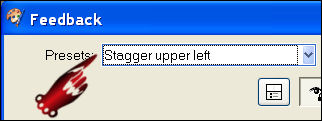
Deselect.
Layers - new raster layer.
Load the selection 'karinhead3'
Repeat the same steps as before but
with the 'feedback'- preset as 'Stagger bottom
right'.
Erase the part that is sticking out at the bottom.
Layers - new raster layer.
Lode the selection: 'karinhead4'.
Apply the feedback effect this time
with the feedback preset on
'stagger top right'.
Erase the part that is sticking out at the top.
Effects - 3D Effects - Drop shadow:
1 / 1 / 50 / 5 / color black.
Layers - Merge - Merge All.
Selections - Select All.
Selections - Modify - Contract by 10.
Selections - Invert.
Fill the border with the gradient
but check the 'Invert' option of the gradient
first.
Repeat the same Inner bevel effect as before.
Deselect (Ctrl+D)
Add your name.
Apply a drop shadow:
1 / 1 / 50 / 5 / color black.
Add your watermark and resize if you want to.
You're done! :-)
Back to Index


Magstags |
Filter Links |
Email |