~*~ Temptations ~*~
Karins's original Dutch
tutorial can be viewed
here
MATERIALS NEEDED:
Download the supplies
here.
The tubes were made by
Jena, Hij, Joluvdogs and Suz.
FILTERS NEEDED:
I.C.NET. Software's Filters Unlimited 2.0.
Open a new canvas, size 600 x 450 pixels
Selections - Select All.
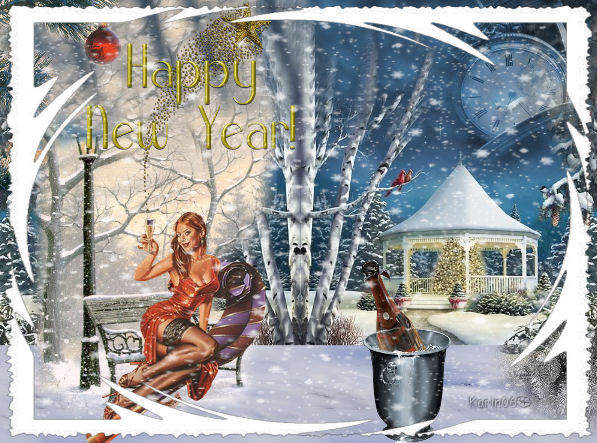
Open the 'nieuwjaar'- tube.
Copy and paste it into the selection.
Selections - Select None.
Open the 'xmas32tube'.
Edit - Copy.
Edit - Paste onto the canvas as a new
layer.
Image - Resize 50% ('Resize all layers'- not
checked)
Change the Blend Mode to 'Soft Light'.
Change the layer opacity to 80% in the
Layers palette.
Move the branch to the top of the canvas.
Open the 'kloktube'.
Copy and paste it as a new layer onto the
canvas.
Image - Resize - 50%.
Change the layer opacity to 50%.
Change the Blend Mode to 'Luminance'.
Move the clock to the top right.
Open the lady tube.
Copy and paste onto the canvas.
Resize to 80%.
Position her on the bench.
Open the happy new year tube.
Paste it onto the canvas.
Resize to 60%.
Arrange it so that the starlets are in the
glass in the woman's hand.
Apply a drop shadow: 1, 0, 70, 1, black.
Open the Cuz champagne flask tube.
Paste onto the canvas.
Resize to 50%.
Image - Mirror.
Place it in the snow below.
Add a new raster layer.
Selections - Select All.
Open the snow tube.
Paste it into the selection.
Deselect.
Change the layer opacity to 80%
in the Layers palette.
Layers - Merge - Merge All.
Duplicate this layer.
Lock the bottom layer in the Layers palette.
Effects - Filter Effects - Filters
Unlimited:
Edges Square - Square Edge 14.
Apply the Square Edge 17 effect next.
Unlock the bottom layer.
Merge all layers.
Add your watermark and save.
Back to Index
Magstags |
Filter Links |
Email |