~*~ Fall ~*~
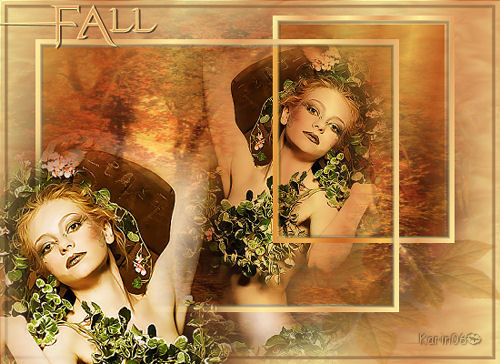
Karins's original Dutch
tutorial can be viewed here
MATERIALS NEEDED:
Download the supplies here.
The tube was made by Marif.
FILTERS NEEDED:
Filter Unlimited 2.0
FM Tile Tools.
1. Open a new transparent canvas, size 550-400.
Open the tube 'fall achtergrond'.
Copy and paste as a new layer onto the canvas.
Layers - new raster layer.
The Color Palette:
Foreground:dark color #ffeb9e
Background: light color #e09c5d.
Make a gradient:
Style - Linear
Angle - 100
Repeats - 5
Invert - checked.
Fill the canvas with the gradient.
Effects - Filter Effects - Filter Unlimited 2.0 -
Distortion:
Surface Tension: 95.
Layers - Arrange - Move Down.
Effects - Filter Effects - FM Tile Tools - Blend
Emboss:
standard.
Layers - Merge - Merge All.
Open the tube 'marif 2006 misted lady'.
Copy and paste as a new layer onto the canvas
Image - Mirror.
Image - Resize: 65%.
Move it to the right edge of the forest.
Minimize for now.
Open a new transparent canvas, size 200 x 250
pixels.
Selections - Select All.
Selections - Modify - Contract by 5.
Fill the selection with the gradient.
Effects - 3D Effects - Chisel: 5/ transparent.
Deselect (Ctrl+D).
Edit - Copy.
Minimize for now.
Open the first canvas.
Edit - Paste as new layer.
Move the frame over the lady.
Select the inside edge of the frame.
Add a new layer.
Fill the inside of the frame with the gradient.
Change the Blend mode of this layer to 'Multiply'
in the Layers palette.
Leave for now.
Open a new transparent canvas, size 400 x 300
pixels.
Selections - Select All.
Selections - Modify - Contract by 5.
Selections - Invert.
Fill the selection with the gradient.
Effects - 3D Effects - Chisel: 5 / transparent.
Deselect.
Edit - Copy.
Leave for now.
Open the first canvas again.
Edit - Paste as a new layer.
Move the frame to the left.
Select the frame.
Add a new raster layer.
Fill this layer with the gradient.
Change the Blend mode to 'Multiply' in the Layers
palette.
Deselect.
Activate the Selection Tool and draw a selection
between the two different frames where the woman
is.
Press 1x delete on the keyboard.
Deselect.
Layers - Merge - Merge All.
Selections - Select All.
Selections - Modify - Contract by 5.
Selections - Invert.
Add a new layer.
Effects - 3d Effects - Chisel: 5 / transparent.
Deselect.
Copy the tube 'marif misted lady' again.
Copy and paste as a new layer onto the canvas.
Resize the layer to 80%.
Adjust - Color Balance - Manual Color Correction:

Move it to the bottom left.
Invert the colors in the color palette.
Add your text in the font 'Evanescent', size 55.
Apply a drop shadow: 1/ 2 / 60 / 1 / color black.
Layers - Merge - Merge All.
Add your watermark and resize
if you want to.
You're finished :)
Back to Index


Magstags |
Filter Links |
Email |