~*~ Autumn ~*~
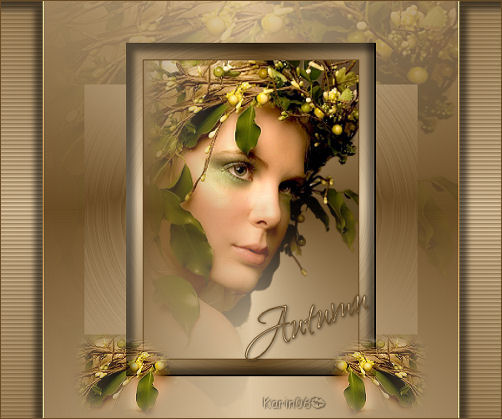
Karins's original Dutch
tutorial can be viewed here
MATERIALS NEEDED:
You need a tube of your own choice.
FILTERS NEEDED:
Funhouse
1. Open a new transparent canvas, size 600 x 500
pixels.
The Color Palette:
Foreground: dark color
Background: light color
Make a gradient:
Style - Radial
Angle - 90
Repeats - 3
Invert - checked
Horizontal and Vertical - 50
Fill the canvas with the gradient.
Layers - Duplicate
Image - Rotate - Free Rotate: Right / 90.
Effects - Edge Effects - Enhance.
Activate the bottom layer in the Layers palette.
Effects - Texture Effects - Blinds:
width 5 / Opacity 50 /
Horizontal - checked / color: your dark color.
Activate the top layer in the Layers palette.
Copy and paste as a new layer onto the canvas.
Use the Deformation Tool to drag the tube
out over the edges.
Change the layer opacity to 20%
in the Layers palette.
Lock the bottom layer in the Layers palette.
Layers - Merge - Merge visible.
Unlock the bottom layer.
Activate the top layer.
Use the Magic Wand to select the left side.
( the blinds-part)
Effects - 3D Effects - Cutout:
Vertical:10
Horizontal: -10
Opacity: 50
Blur: 10
Color: black.
Deselect (Ctrl+D).
Select the Right side of the blinds now.
Effects - 3D Effects - Cut Out:
V & H: 10
Opacity: 50
Blur: 10.
Color: black.
Deselect (Ctrl+D)
Layers - new raster layer.
Selections - Select All.
Selections - Modify - Contract by 100.
Fill the selection with the gradient.
(the 'Invert'-option of the gradient
should now by unchecked before you apply it.)
Effects - Filter Effects - Funhouse - Circus
Maximus: 170.
Image - Rotate - Free Rotate: Right / 90.
Effects - 3D Effects - Cutout:
H & V: 10
Opacity: 50
Blur: 10
Color: black.
Layers - new raster layer.
Repeat the cutout effect with:
-10 / -10 / 50 / 10.
Selections - Select All.
Selections - Modify by 20.
Paste your tube.
If you use a tube
you must add a new layer and fill it with the
gradient.
Layers - Arrange - Move Down.
Layers - Merge - Merge All.
Add a 1 pixel border in the dark color.
Resize to 300 pixels in height.
Copy and paste it into the selection.
Deselect.
Change the Selection Tool to Freehand / Feather
20.
Select a small part of the tube.
Edit - Copy.
Edit - Paste as new layer onto the canvas.
Arrange it where you want it.
Layers - Duplicate.
Image - Mirror.
Add our text.
Apply a drop shadow:1 / 1 / 50 / 5 / color black.
Layers - Merge - Merge All.
Add a 1 pixel border in the dark color.
Resize the image and add your watermark.
The tag is finished :)
Back to Index

Magstags |
Filter Links |
Email |