|
Memories
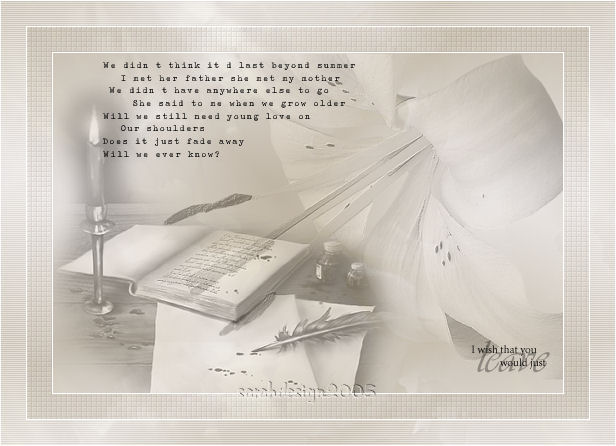
Sarah's original Dutch tutorial can be viewed
here.
MATERIALS NEEDED:
Download
the supplies
here
***
FILTERS NEEDED:
Xero
FM Tile Tools.
Download the filters here
***
If you want to share
Sarah's tubes,
or any of the other
tubes included in the zip files,
kindly leave the
filenames intact
when sharing them.
We're ready to begin :)
Open the tubes
and pattern in PSP.
Save the brushes in
your Brushes folder
or import them into
PSP.
Remember to save
often, ok! :)
1. Open a
transparent canvas, size 600x400 px.
Change your
foreground color to the pattern
included in the zip.
Fill the canvas with
the pattern.
2.Open the flower tube.
Copy and paste as
a new layer.
Position it with
your Mover Tool
in the upper
right corner.
Change the Blend
Mode of this layer to
'Luminance(Legacy)'.
Change the Opacity
of this layer to 40% in your Layers palette.
3. Apply -- Effects
-- Filter Effects --
FM Tile Tools --
Blend Emboss - standard.
4. Open the book tube.
Copy and paste as a new layer.
Position it in the
bottom right corner.
Change the Blend
mode to 'Luminance'.
5. Merge all
layers.
Resize image to 85%
with
'Resize All Layers'
checked.
6. Add a 1px white border.
7. Add a 25 px black
border.
Select the border
with your Magic Wand.
Fill with the
pattern.
8. Apply Effects --
Filter Effects -- Xero -- Fritillary
with the default
settings.
9. Add a 1 px white border.
10. Add a 25px black
border.
Select with your
Magic Wand
and fill with the
same pattern as before.
11. Apply Effects -- Texture Effects -- Blinds
with these settings:
2,44,white, 'horizontal' checked.
12. Add a 1px white border.
13. Add a new raster
layer.
Change your
background to black.
14. Activate your Brush
Tool.
Find the '11toustone017'-
brush.
Apply to the upper
left area of the canvas.
15. Add a new raster
layer.
Find the 'sxycrzykewl'
- brush.
Apply in the lower
right corner of the canvas.
16. Add your watermark.
Merge all layers.
You're
finished :)
©Sarahdesign
okt 2005.
Back to Index
Translated
3rd March 2006.
The graphic design of this page is
copyrighted to ©Magstags2005-2008
Home | Filter Links |
Email |Terms
Of Use |
|