|

~*~ Reflection ~*~
266
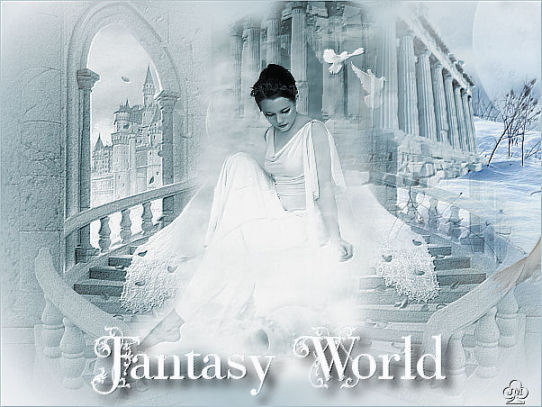
Jeannette's original Dutch tutorial can be found
here
***
Click on the example above to view the
working script
***
The images and tubes were made by
Chantal and Heidi.
Don't open the bird in PSP,
you need it for the script.
Download the supplies
here
***
FILTERS NEEDED:
FM Tile Tools
***
Foreground color: #BACED7
Background color: #FFFFFF
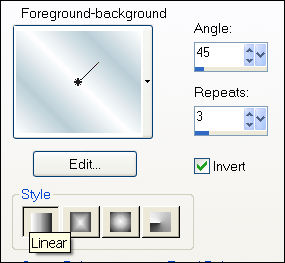
Make a gradient
with these settings:
1. Open a new transparent canvas, size 600 x 450 pixels.
Fil with the gradient.
2. Open the stairs-tube.
Remove the watermark.
3. Adjust - Hue and Saturation - Colorize:
Hue 136 / Saturation 38.
4. Copy and paste it on the canvas
and move it to the left.
5. Duplicate this layer in the Layers palette.
6. Image - Mirror.
7. Open the lady tube.
Remove the watermark
8. Colorize it with the same settings as before.
9. Duplicate this layer in the Layers palette.
Layers - Merge - Merge visible.
10. Copy and paste it on the canvas.
Move it a little to the left.
11. Open the tube 'fantasy 225.
Remove the watermark and colorize as before.
12. Copy and paste on the canvas.
Move it to the right and arrange it so that
the woman is not visible anymore and the ruines
are fitting nicely against each other.
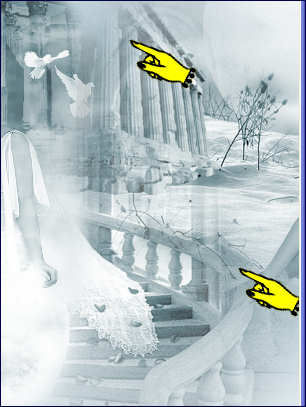
13. Actviate the mirrored layer in the Layers palette.
14. Use the Eraser tool to remove the parts
that is covering the water and the ruines
as seen below:
15. Merge layers visible when everything is in place.
16. Filter FM tools - Blend Emboss.
17. Add a 1 pixel border in the foreground color.
18. Lock the foreground color and type your text
in a font of your choice.
19. Effects - 3D Effects - Drop shadow:
10 / 10 / 90 / 15,00.
Deselect.
Merge Layers.
If you don't want to use the script you
can add another border now.
You need an additional 2 background tiles,
as well as the bird image for the script.
©Jeannette 23-6-2007
***
Have fun !!
Download Jeannette's empty script here.
Back to Index

Home |
Filter Links |
Email| Terms Of Use |
|