|
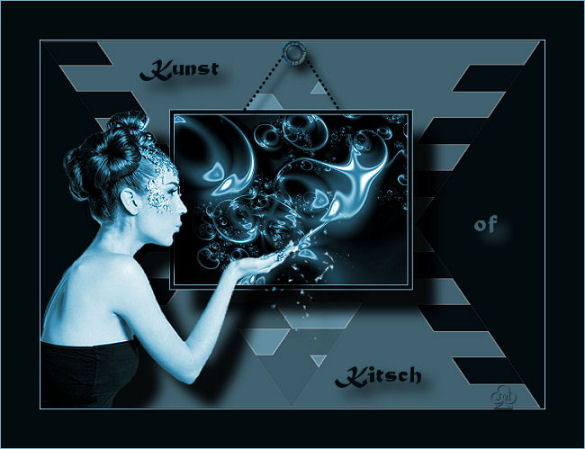
The Art Of Kitsch
~*~ 249 ~*~
Jeanette's original Dutch tutorial can be found
here
***
Click on the example above to view the
working script
***
The tubes was made by MC
Download the supplies
here
***
FILTERS NEEDED:
DSB Flux
Change your foreground color to #81BBD4,
background to #020B0E.
1. Open a new transparent canvas, size 650x475.
Fill with the background color.
2. Activate the Selection Tool - Rectangle.
Draw a triangle, begin in the top left corner and draw it
to the bottom right corner.
3. Add a new raster layer.
Fill the selection with the foreground color.
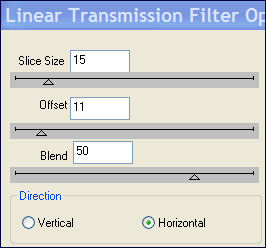
4. Filter DSB Flux --> Linear Transmission:
5. Effects --> Edge Effects --> Enhance.
Deselect.
6. Set the layer opaicity on 50% in the Layers palette.
Duplicate this layer in the Layers palette.
7. Image --> Mirror.
8. Merge layers visible.
9. Open the fractal image.
Add borders: 1 px - foreground color.
Add border:4 px - background color.
Add border: 1 px - foreground color.
10. Copy and paste onto the canvas.
Move it about ½ cm to the top.
11. Effects --> 3D Effects --> Drop Shadow: 30 30 90 20,00.
12. Open the lady tube.
Remove the watermark layer.
Copy and paste onto the canvas.
Move it to the bottom left.
13. Adjust --> Hue and Saturation --> Colorize: 140 128.
14. Sharpen 1x.
Repeat the same drop shadow as in step 11.
15. Merge layers visible.
16. Invert the foreground and background colors.
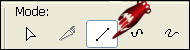
17. Activate the Pen Tool, with these settings below:

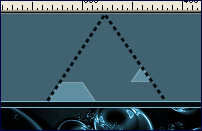
18. Draw a line as seen in the example below:
19. Keep the Shift-key pressed in.
20. Effects --> 3D Effects --> Drop Shadow: 10 10 90 10,00.
21. Open the button tube.
Copy and paste onto the canvas.
Move it to the top.
Apply a drop shadow: 10 10 50 10,00.
22. Merge layers visible.
23. Add border: 1 px - light color;
Add border: 50 px - dark color;
Add border: 1 px - light color.
24. Resize to 650 in width.
25. Change the background color to the dark color
and lock the foreground color.
26. Type ' Art' - in the 'Matura MT Script' - font
Capitals - size 20.
27. Effects --> 3D Effects --> Drop Shadow:10 10 90 20,00.
Deselect.
28. Type the word 'Kitsch'.
Repeat step 27.
29. Change the background to the light color and type the text;
or repeat step 27, but the drop shadow color should then be the
light color.
To use the script you need to make 2 more backgrounds.
Have fun !!
Download the empty script
here.
Back to Index
Home |
Filter Links |
Email| Terms Of Use |
|