|

*~*Santa's
Greetings
*~*
(non-animated tutorial)
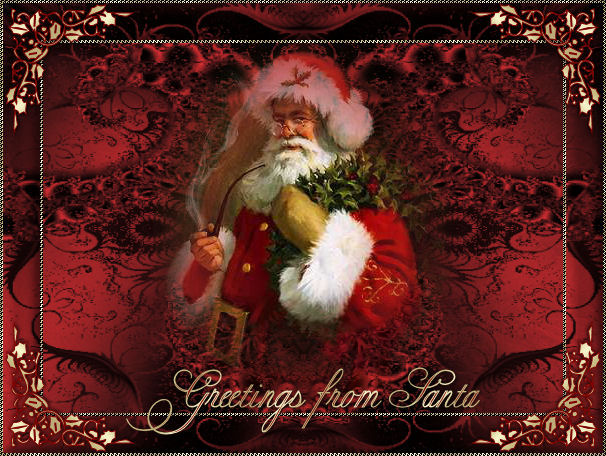
Jeanne's original Dutch
tutorial can be viewed
here.
The tutorial was created
in PSP 9.
MATERIALS NEEDED:
Download the supplies
here.
(File size - 505kb)
The background was made by
Jeanne
She is currently learning
how to
make fractals at this
Dutch club below:

You can also explore
the world of Fractals
on the
Magstags Fractal Page
FILTERS NEEDED
Screenworks - Close knit
***
Ok, let's do it! :)
THE COLOR PALETTE
Foreground color #aa2424
Background color on a gold
pattern
Open a new transparent
canvas, size 600 x 450
pixels.
Fill with the foreground
color.
Layers - New Raster layer
Selections - Select All.
Copy and paste the image
'jeanne_fractaltest'
into the selection.
Selections - Select None.
Adjust - Hue and
Saturation - Colorize:
Hue 255 / Saturation 164.
Copy and paste the tube
'tinad(14)' onto the
canvas.
Click on the second layer
in the Layers palette.
Activate the Eraser tool
and carefully clean up
Santa's face :)
Layers - Merge - Merge
All.
Selections - Select All.
Selections - Modify -
Contract by 40
Selections - Invert.
Fill with the gold
pattern.
Effects - Filter Effects -
Screenworks - Close Knit.
Selections - Select All.
Selections - Modify -
Contract by 37.
Selections - Invert.
Click 1x on your delete
key.
Activate the bottom layer
in the Layers palette.
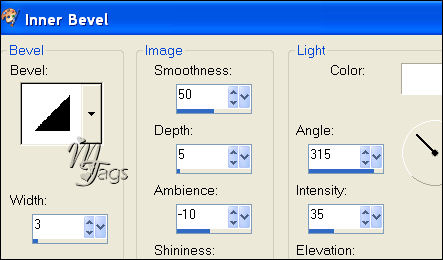
Effects - 3D Effects -
Inner Bevel:
Layers - merge - Merge
All.
Selections - Select None
Image - Add Borders: 3
pixels white.
Select with the Magic
Wand.
Layers - New Raster Layer
Fill with the gold
pattern.
Filter - Screenworks -
Close Knit.
Selections - Select None.
Copy and paste the corner
tube onto the canvas.
Position it as seen in the
example.
Layers - Duplicate.
Image - Mirror.
Layers - Duplicate
Image - Flip
Layers - Duplicate
Image - Mirror.
You have 4 corners now.
Layers - Merge - Merge
All.
Layers - New Raster layer.
Activate your Text tool
and find
a nice font, such as
'Copper Alt Caps extra',
size 26.
Type your text - the gold
pattern should
be the foreground color.
Add your watermark or name
and you're done! :)
Merry Christmas!
©Jeanne
All Rights Reserved.
Please take a few
minutes to write
a message in
Jeanne's Guestbook.
Thank you kindly.
Back to Index

translated on the 30th
December 2006

The graphic
design of this page is
copyrighted to
©Magstags - All Rights
Reserved.
Home |
Filter Links |
Email |
Terms Of Use |