|

*~*October
- The Month of Wine
*~*
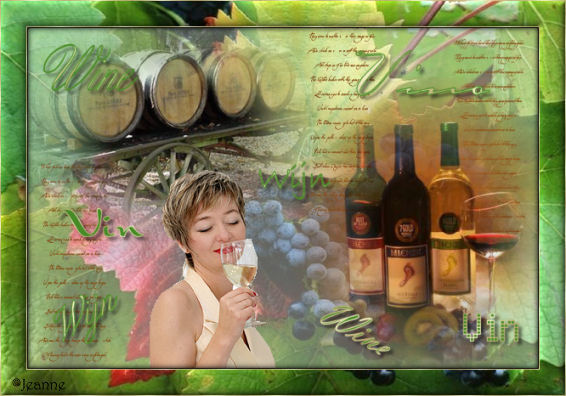
Jeanne's original Dutch
tutorial can be viewed
here.
This tutorial was created
in PSP 9.
MATERIALS NEEDED:
Download the supplies
here:
(File size - 2,379 kb)
THE COLOR PALETTE
Change the foreground
color to a gold pattern,
background to a color of
your choice.
Open a transparent canvas,
600 x 400 pixel.
Selections --> Select All.
Copy the 'Druiventros'
image.
Paste it into the
selection on the canvas.
Reduce the layer's opacity
to 64%
in the Layers palette.
Add a new layer.
Open the 'lynd04-040
002.PspBrush'- Brushtip in
PSP.
Click on it.
Go to File --> Export -->
As PSP Brush.
Give it a name and click
on 'ok'.
It will be available to
you now in your Brush
folder.
Activate the Brush tool,
find the brush.
Change the foreground
color to #844b15.
Apply the brush 1x to the
canvas.
Copy and paste the image
'wijnflessen' onto the
canvas.
Resize to 80% (Resize All
Layers = unchecked)
Position it in the
bottom right corner.
Copy and paste the tube
'wijnvaten' onto the
canvas.
Resize it to 70%.
Position it in the top
left corner.
Copy and paste the tube
'vrouw met
wijnglas.pspimage'
onto the canvas.
Arrange her slightly in
the bottom center ( see
example)
Layers --> Merge --> Merge
All.
Change the foreground
color to #478b26.
Select the Text tool
Add your name to your
image.
Apply a few wine-related
words
in different fonts to the
image.
Rotate them around.
Interchange the background
and foreground colors
as well in the process.
Apply a drop shadow:
V & H - 2
Opacity - 50
Blur - 6
Color black.
Layers --> Merge --> Merge
All.
Selections --> Select All.
Effects --> 3D Effects -->
Cutout:
H & V - 10
Opacity - 100
Blur - 10
Color - black.
Image --> Add Borders:
1 px white.
Select with the Magic Wand
and fill
with the gold pattern.
Selections --> Select
None.
Image --> Add Borders: 25
pixels in the foreground
color.
Select with the Magic
Wand.
Copy the 'druiventros'
image.
Paste it into the
selection on the canvas.
Effects --> 3D Effects -->
Inner Bevel:
Bevel 2
Width 13
Smoothness 16
Depth 3
Ambiance 0
Shinniness 0
Angle 315
Intensity 44
Elevation 33
Color white.
Add a 1 px white border.
Select with the Magic Wand
and fill
with the gold pattern.
Selections --> Select
None.
Resize your image to 85%.
Add your name and you're
done ! :-)
Please take a few
minutes to write
a message in
Jeanne's Guestbook.
Thank you kindly.
Back to Index

translated on the 30th
December 2006

The graphic
design of this page is
copyrighted to
©Magstags - All Rights
Reserved.
Home |
Filter Links |
Email |
Terms Of Use |