|

*~*
Hidden Thoughts
*~*
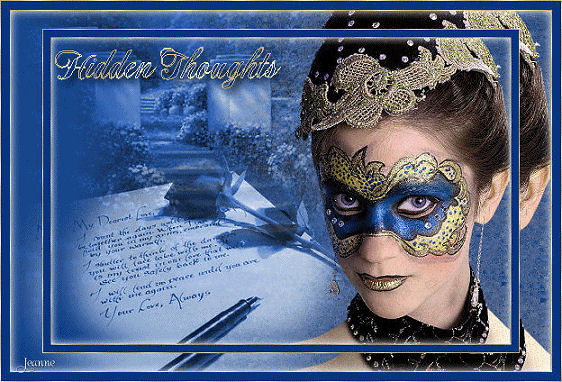
Jeanne's original
animated Dutch
tutorial can be viewed
here.
Image
filesize is 198.4kb
The tutorial was created
in PSP 9
but can also be done in
other versions.
MATERIALS NEEDED:
Download the supplies
here.
(file size - 1,530 kb)
FILTERS NEEDED
Filter Adjust - Variations
Filter Unlimited - Render
Change the foreground
color to #233e97
Set the background on the
gold pattern
Open a new canvas, 600 x
400 pixels.
Fill with white.
Filters Unlimited -
Render: Clouds
(white/bleu)
Copy and paste the tube
'mist 28' onto the canvas.
Image--> resize: 70% -
'Resize All Layers' not
checked.
Move it to the top left
corner.
Copy and paste the tube
'patry mist_06' onto the
canvas.
Move it to the bottom
left.
Layers --> Merge --> Merge
Visible.
Effects--> Artistic
Effects --> Sepia Coloring
Effects --> Filter Adjust
- More Bleu
(Repeat the effect if you
want more bleu)
Copy and paste the tube
'vrouw masker' onto the
canvas.
Image --> Mirror
Move her to the right.
Layers --> Merge --> Merge
Visible.
Selections --> Select All.
Effects --> 3D Effects -->
Cutout
V & H 0
Opacity 100
Blur 10.00
color black.
Selections --> Select None
(Deselect)
Image--> Add Border: 1
pixel white.
Select with the Magic Wand
and fill with the gold
pattern.
Image--> Add Border: 5
pixel in the blue color
Image--> Add Border: 1
pixel white.
Select with the Magic Wand
and fill with the gold
pattern.
Layers--> Duplicate
Image--> Resize 90%
Activate the Text tool
with a nice font
and type the text onto the
canvas.
Apply a drop shadow:
H & V 6
Opacity 60
Blur 10.00
Color black
Layers --> Merge --> Merge
All.
Activate the Selection
tool: Freehand Selection:
point to point
Mode - Add / Feather
0.
Select, with the Shift key
pressed down, all around
the mask until everything
is selected.
Adjust --> Add/Remove
Noise --> Add Noise:
15 / Gaussian and
Monochrome = checked.
Deselect.
Edit Copy.
Open Animation Shop.
Edit --> Paste as New
Animation
minimize AS.
Back to PSP.
Edit --> Undo 2x
(The marching ants should
be active around
the mask again)
We're going to add
different noise effect to
the
selection now.
Adjust --> Add/Remove
Noise --> Add Noise:22
Deselect.
Edit --> Copy
Open Animation Shop
Edit --> Paste --> After
Current Frame.
Back to Paint Shop again.
Edit --> Undo 2x.
Adjust --> Add/Remove
Noise --> Add Noise:30
Deselect.
Edit --> Copy
Open Animation Shop.
Edit --> Paste --> After
Current Frame
Click in the top toolbar
on the 'View Animation'-
icon
to see how the animation
looks like.
It should be 3 frames.
Click on the icon again to
close it.
Save as a GIF image.
Nice, huh? :-))
Please take a few
minutes to write
a message in
Jeanne's Guestbook.
Thank you kindly.
Back to Index

translated on the 30th
December 2006
The graphic
design of this page is
copyrighted to
©Magstags - All Rights
Reserved.
Home |
Filter Links |
Email |
Terms Of Use |