|

*~*Crossing
the Seven Seas
*~*
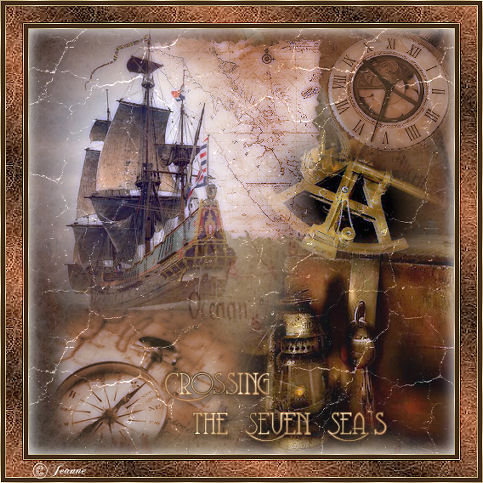
Jeanne's original Dutch
tutorial can be viewed
here.
The tutorial was created
in PSP 9.
MATERIALS NEEDED:
Download the supplies
here.
(file size - 2,709 kb)
Open all the images in PSP
and minimize to the
taskbar for now.
FILTERS NEEDED
Filters Unlimited Photo
Aging Kit
Xero - Porcelain
COLOR PALETTE
Foreground color #432c1c
Background color #ad6c49
Change the foreground
color to gradient
with these settings:
Style - Linear
Angle = 38
Repeats - 6
Invert - unchecked.
Change the background
color to gold pattern.
Open a new transparent
canvas, size 500 x 500
pixels.
Fill with the foreground
color.
Effects - Filters
Unlimited - Paper texture
- Fibrous Coarse standard.
Selections - Select All.
Layers - New Raster
Layers.
Copy and paste the image
'landkaart1'(map)
into the selection on the
canvas.
Selections - Select None.
Change the layer's opacity
to 52% in the Layers
palette.
Open the tube 'kist met
slot'.
Image - Resize 80%.
Copy and paste as a new
layer onto your canvas.
Move it to the bottom
right.
Copy and paste the tube
'landkaart 2' onto the
canvas.
Move it the top.
Effects - Filter Effects -
Xero - Porcelain.
Copy and paste the tube
'hist_content1'
as a new layer onto the
canvas.
Move it to the top left.
Copy and paste the tube
'clock'
onto the canvas.
Image - Resize 60%
('Resize All Layers'=
unchecked)
Layers - Arrange - Move to
Top.
Change the layer's opacity
to 62% in the Layers
palette.
Move it to the top right.
Copy and paste the tube
'CarolaMist_objects'
onto the canvas.
Image - Resize: 50%.
Adjust - Hue and
Saturation - Colorize
Hue - 17 / Saturation -
105.
Move it to the bottom
left.
Copy and paste the tube
'sextant'
onto the canvas.
Image - Resize:80%.
Move it into position as
seen in the tag example.
Layers - Merge - Merge
All.
Effects - Filter Effects -
Xero Porcelain.
Effects - Filters
Unlimited - Photo Aging
Kit -
Cracked paper with the top
slidebar on 92.
Selections - Select All.
Effects - Cutout:
H & V - 0 / Opacity - 100
/ Blur - 15.00 / Color
white.
*Image - Add Borders:
1 pixel - black
Select with the Magic Wand
and fill with the gold
pattern.
Selections - Select None.
Add borders:
5 pixels - foreground
color.
1 pixels - white.
Select with the Magic Wand
and fill with the gold
pattern.
Selections - Select None.*
Image - Add Borders:
20 pixels - foreground
color.
Select with the Magic wand
and fill with the
gradient.
Effects - Filters
Unlimited - Paper texture
- Fibrous Course Standard.
Effects - Edge Effects -
Enhance.
Selections - Select None.
Repeat from * to *.
Image - Resize: 85%
'Bicubic'= checked.
Add your name or watermark
and you're done! :-)
Have fun!
©Jeanne
All Rights Reserved
Please take a few
minutes to write
a message in
Jeanne's Guestbook.
Thank you kindly.
Back to Index

translated on the 30th
December 2006

The graphic
design of this page is
copyrighted to
©Magstags - All Rights
Reserved.
Home |
Filter Links |
Email |
Terms Of Use |