|

*~* Purple Beauty *~*
195
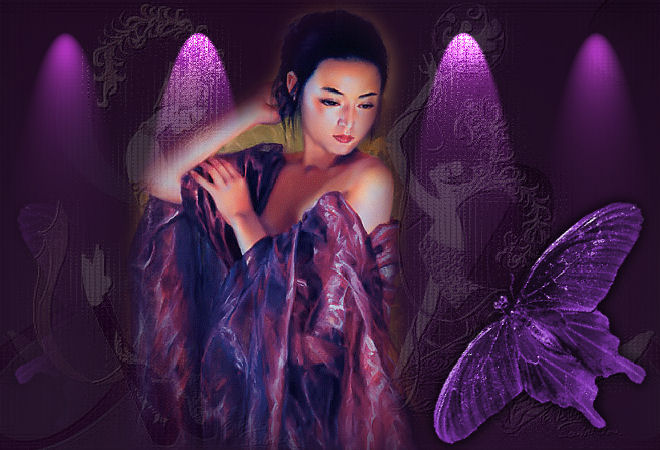
Click on the image to view the working script
Jeanette's original Dutch tutorial can be viewed
here.
Supplies: here.
The lady tube was made by Suzi Sgai.
Filters: FM Tile Tools
Set the foreground color on #2D0730.
1. Open the background image.
2. Effects --> Filter FM Tile Tools --> Blend Emboss - standard.
Repeat 1x.
3. Duplicate this layer in the Layers palette.
Lock the bottom layer.
4. Add a new raster layer.
Fill with the foreground color.
Change the opacity of this layer to 85%
in the Layers palette.
5. Merge layers visible.
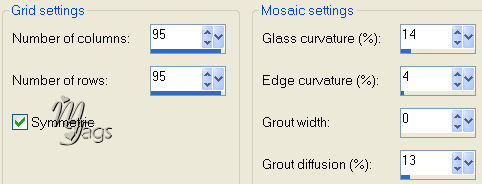
6. Effects --> Texture Effects --> Mosaic Glass:
7. Effects --> Illumination Effects --> Lights : Start out with
the preset on 'Bottom 5'.
(the preset is included in the zip of the 'Spotlight'- tutorial)
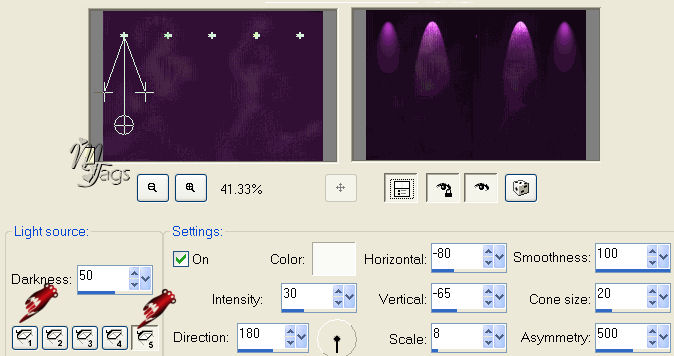
8. PLEASE NOTE:!!
Click on the the first light and change the settings to these above.
Then click on light 5 and apply the same settings as shown above.
9. Now click on the second light option and
change the settings as shown below:
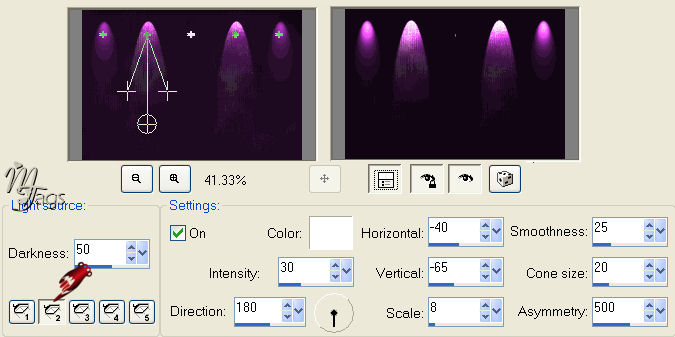
10. Apply the same settings to light no. 4.
11. Change the 'Cone size' to '0' in the 3rd light window.
The rest of the settings for light 3 should be the same as lights 2 and 4.
Apply.
12. Unlock the bottom layer in the Layers palette.
13. Open the lady tube.
Copy and paste as a new layer.
Drag her to the left.
Sharpen 1x.
14. Open the butterfly tube.
Copy and paste as a new layer.
Drag it to the bottom right corner.
15. Effects --> 3D Effects --> Drop Shadow: 2 2 70 15,00.
Repeat with V & H on minus -2.
16.Merge layers visible.
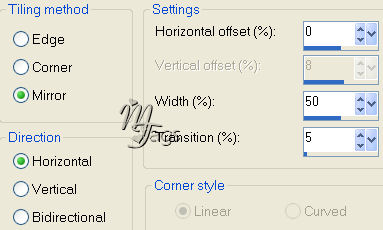
17. Effects --> Image Effects --> Seamless Tiling:
Your tag is finished. :-)
You need an additional 2 backgrounds if you
want to use the script.
The butterfly should also be mirrored and saved as a GIF
Click here if
you want to know how to do it.
Have fun!!
Download the empty script
here.

BACK to Index
Jeanette's other tuts
Page 1
Page 2
Page 3
Xmas
Tuts
If you enjoyed Jeanette's tutorial please
be so kind and write
a message in her
guestbook.
Translated on 26th December 2006

The graphic design of this page is
copyrighted to Magstags.
Home |
Filter Links |
Email| Terms Of Use
|