|


Traudel Topper
***
Materials needed
1.
PSP 8 or 9
2. Supplies:
download
here
2. Selection:
CrisTaylor_Traudel
Save it in Your PSP
Selections folder
3. Texture:
-
CrisTaylor_traudel -
Save it in your PSP Textures
folder
4. A tube of your choice
***
1.
Open your tube
Edit --> Copy
Minimize it.
2.
Choose a color from your
tube as foreground color.
Change the background color
to #FFFFFF
Change the foreground to
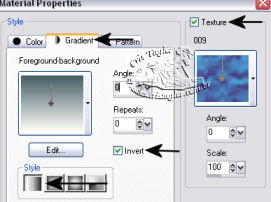
Gradient and check the "texture" setting.
Find the
"CrisTaylor_traudel2.psd" texture,
as seen in the settings
below:
Gradient settings:
Angle - 0; Repeats - 0;
Style-Linear;
Invert - checked
Texture settings:
Angle - 0;
Scale - 100;
3.
- Open a new
transparent canvas 800 x 400 pixels.
Flood fill with the
gradient.
Click on the right
side of the image and flood fill with the a clear color.
Click with the
mouse on the left side and fill with the gradient.
4 - Effects > Edge Effects >
Enhance
5 - Selections > Load/Save Selection >
Load Selection
From Disk>
Find the Cristaylor_traudel
selection and load
Click "Delete" on the keyboard.
Effects > 3D Effects > Drop
Shadow, with these settings:

6 - Layers > New Raster Layer
Flood fill with a
color of your choice.
Layers > Arrange >
Move Down
7 - Edit > Paste as New Layer
Move the tube into position
with the Mover Tool.
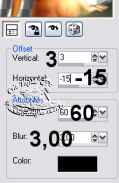
Effects > 3D Effects >
Drop Shadow, with these
settings:
14 - Add your watermark
or name.
Layers > Merge All
15 - Use it as a fixed
background in Outlook Express
For you Traudel, Happy Birthday
Tutorial was written by Cris
Taylor
© - 2003 2005. All Rights Reserved By Cris
Taylor
Translated 6thJuly2005
Tutorial was written by Cris
Taylor
Copyright- 2003 2005.
All Rights Reserved By Cris Taylor

Copyright - Magstags2005
Home |
Filter Links |
PSP Goodies
|