1 - Open your
tube in PSP and resize to a height of 300pixels
Edit > Copy, minimize
2 - Open a new
transparent image of 800x270 pixels
Flood Fill with a color of your choice
that compliments the tube.
3 - Selection >
Selection All
Edit > Paste Into Selection
Selection > Selection None
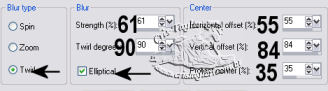
4 - Adjust > Blur > Radial Blur,
with these settings:
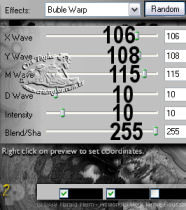
5 -Effects > Plugins > Plugin Galaxy > Warp 2 >
Bubble Warp, with these settings:
6 -Effects > Edges
Effects > Enhance
7 -
Layers > Load/Save Mask > Load Mask From Disk,
find the
mask Cris Taylor_Traudel > Load
Layers > Delete Mask
reply "yes" to the question.
Layer > Merge Group
8 - Layers > New
Raster Layer
Image > Canvas Size 800 x 320px
Flood Fill with a color of your choice
Layers > Arrange > Move Down
9 - Activate
the Topper Layer
Effects > 3D Effects > Drop Shadow,
with these settings:
Happy Anniversary
Moleca, Sapeca and Querida
Tutorial was written by Cris
Taylor