Materials needed
Program PSP 8 or 9
A tube
***
1 - Open your
tube in PSP and resize to 380 pixels in height
Edit > Copy
2- Open a new
transparent image of 800 x 400 or 1024 x 400 pixels
Fill with a color from the tube( or compliments your tube)
3 -Selection >
Selection All
Edit > Paste Into Selection
Selection > Selection None
4 -Effects > Image
> Seamless Tiling > Factory Defaults
5 - Adjust > Blur
> Motion Blur > Angle 307 > Strenght = 100%
Repeat this effect 2 more times
6- Effects >
Reflections Effects > Feedback, with the following settings:
Opacity = 62 >Intensity = 82 > Horizontal & Vertical Off Set% = 100
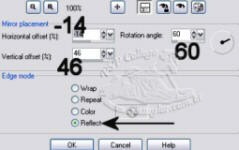
7- Effects > Reflections Effects > Rotating Mirror,
with these settings:
8- Edit > Paste as
New Layer
Move the tube into position with your Mover Tool
10 -Add your
watermark or name .