2 - Open a new transparent image of
300 x 300 pixels
Selections > Select All
Edit > Paste Into Selection
Selection > None
3 -Effects > Image Effects >
Seamless Tiling > Factory Defaults
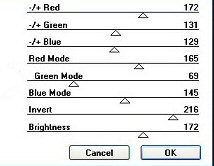
4 - Effects > Plugins
> Color Rave >
Color Cocktail
2.1,
with these
settings:
5 - Edit
> Copy
Minimize
6 - Open
a new transparent image of 1024 x 300 pixels
Selections > Select All
Edit > Paste Into Selection
Selection > None
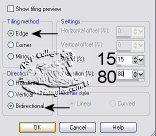
7 -Effects > Image Effects > Seamless Tiling,
with these settings:
8 -Effects > Image Effects > Seamless Tiling >
with these settings:
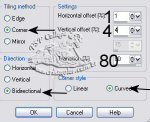
9 -Effects >
Image Effects > Seamless Tiling >
with these
settings:
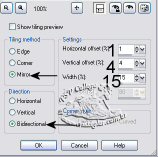
10 - Effects > Plugins > ICNet Software >
Filters Unlimited 2.0 Color Filters > Sépia,
with these settings:
Save and
minimize your background for now
Activate your minimized tube
11 -Repeat the effects in step 10
12- Layers > Masks > Load From Disk,
Mask nevoa, or one of your own
choice
Layers > Delete Mask Layer
Layers > Merge Group
Edit > Copy or ( Ctrl+C)
Activate your bakcground-canvas
13- Edit > Paste as New Layer
Position the tube with your Mover Tool
where you want it
14 - Add your watermark or name on a
new layer
15
-Layers > Merge All .
Tutorial was written by Haya