|

Illusion Back (Scripted
and unscripted)

original tutorial:
http://www.cristaylor.com.br/free/s003/arquivo.asp
***
Material needed
Program PSP 8 or 9
Plugin
Simple Filters
A tube
Script CrisTaylor_Illusion (download here)
***
1 -Save your script in > My PSP Files > Scripts
Restricted
2 - Open your tube in PSP
3 - File > Scripts > Run > My PSP Files> Scripts
Restricted > CrisTaylor_Fantasy.PspScript
Click on Run.
4 - The script will ask you to choose the foreground-
and background colors,and will show you which settings is used in the
different applications.
5 - Add your name or watermark on a new layer
Layers > Merge All
Script was created by Cris Taylor
© - 2003 2005. All Rights Reserved By Cris
Taylor
***
TUTORIAL UNSCRIPTED
(supplied by Maggie)
Open your tube in PSP.
Choose a foreground and background color from your
tube.
Edit > Copy and minimize for now
Open a new transparent image of 800 x 600 pixels and
fill
with the foreground color.
Selections> Select All.
Edit >Paste Into Selection.
Deselect or (Ctrl +D.)
Merge all layers.
Effects > Image Effects > Seamless Tiling,
with these settings:
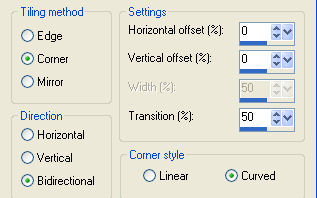
Adjust > Blur > Gaussian Blur - Radius 20, 29
Effects > Plugins > Simple Filters > Blintz
Repeat this effect twice.
Effects > Plugins > Simple Filters - 4 Way Average.
Add a new raster layer and fill with white.
Reduce the opacity of the white layer to 26%
Merge All Layers.
Save your background.
Open your minimized tube.
Edit > Copy
Open your background canvas.
Edit > Paste as new layer.
Position the tube where you like it on the canvas.
Apply a Drop Shadow of your choice.
Add your name or watermark on a new layer.
Merge All Layers.
Translated by Maggie 10th July 2005.
Copyright- 2003 2005.
All Rights Reserved By Cris Taylor

Copyright - Magstags2005
Home |
Filter Links |
PSP Goodies
|