Anouk Background

original tutorial: http://www.cristaylor.com.br/free/g010/arquivo.asp
Material Needed:
PSP 8 or 9
Plugins: Filter Factory Gallery Q: download
here
I.C Net Software's
Simple Filters: download
here
A tube
1 -Open your
tube in PSP , resize to 280 in height
Edit > Copy
2 - Open a new transparent image of 1024 x
300 or 800x 300 pixels
Fill with a color from your image
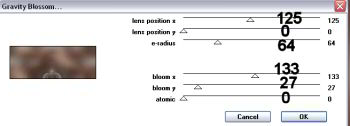
2 -Effects >Plugins >Filter Factory Gallery Q > Gravit Blossom ,
with these settings:
3 - Effects >
Image Effects > Seamless Tiling > Factory defaults.
4-Adjust >
Sharpness >Sharpen More.
5 - Edit >
Paste as New Layer.
Position your tube where you like it.
6 -Add your
name or watermark on a new layer
Tutorial was written by Cris Taylor