1. Oracle 7 or 8 server
2. A TCP/IP network
3. Oracle connectivity components available on the Oracle Developer CD
Assuming that you already have an Oracle server running on a TCP/IP network we may proceed to the tricky part of this, the client setup. You will need three critical pieces of information.
1. The server IP address or domain name if your network has a DNS. This can be obtained from your network admin or DBA
2. The database SID. Get this from your DBA.
3. A login name and password. Get this from your DBA
Install the Oracle SQL*Net Client from the Oracle Developer CD.
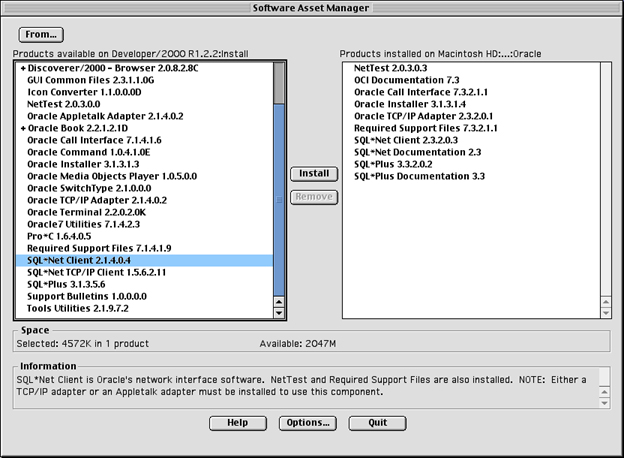
Once you install the Oracle SQL*Net Client it should all be located in a folder called "Oracle" in the root of your hard drive (ex. Macintosh HD:Oracle).
Open the application called Easy Config located in the "Oracle:Applications:Networking" folder.
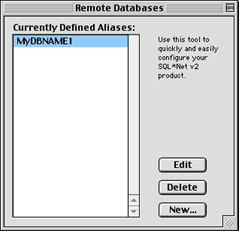
You will see a window similar to the one above. Press the "New..." button.
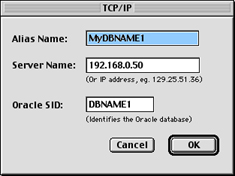
You will then get a window similar to the one above. Enter the folowwing information.
The Alias Name (MyDBNAME1) is a name that you give to your setup entry. You will use it when you log in to your Oracle database. It is similar to the domain source name in ODBC.
The Server Name (192.168.0.50) is the IP address of the Oracle server. You may also put the domain name here if the server has one.
The Oracle SID (DBNAME1) is the name that the Oracle server knows the database as. Ask your DBA what your SID is.
Trick: This application edits your tnsnames.ora file. You may take the tnsnames.ora file from a Windows machine that can connect to the Oracle Server that you wish to connect to, place it in the Oracle:Network:Admin" folder and it should work just the same on the Mac.
Once you have set up your client workstation with the correct information you can use the following REALBasic code to test your setup. Make sure you substite your own information for the username, alias and password in the code.
Sub Open()
Dim db as database
'db = openOracleDatabase("username@alias", "password")
db = openOracleDatabase("smarty@MyDBNAME1", "letmein")
if db <> nil then
msgBox "Connected to the database."
Else
msgBox "Could not connect to the database"
End if
End Sub