|
|
|
|
1. Logo to represent the topic SEE ABOVE 2. Definition, look up at http://www.m-w.com 1 : any of the small discrete
elements that together constitute an image (as on a television screen) 3. Your Examples a- Basic Mouse Over
b- Custom Mouse Over
c- Web Site Banner
d- Pixel Paint Banner
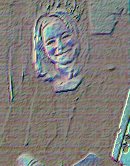
e- Enhanced Photo
f- Micro Button
4. Writing to support examples 3a. The basic mouse over was done with 2 different pictures and I made them as hoer buttons so when you put the mouse over the picture it changes into the other picture. 3b. This was done the same way I did with the mouse over I just used different pictures. 3c. I made my banner in Paint Shop Pro using layers, flood fill and for the picture on there I used the selection tool to cut out a piece of my digital picture. 3d. The same was done for my banner except I used a piece of clip art instead of a digital picture. 3e. This was my digital picture. I used the effect tool to change the appearance of it. 3f. I made this micro button in Paint Shop Pro using layers, fill and text. 5. Skills for topic
6. Online Resources a- http://jasc.com/ ~ Paintshop Pro Makers 7. Online Tutorials a- Tutorial #1 b- Tutorial #2 8. Careers * Photography * Graphic Arts * Web Designer
|
|
|